
📖 Table of Contents (Tap to Navigate)▼
1. Why AuraFlux Works as Your Everyday Reverb
Welcome to AuraFlux (v0.1.0) — a studio stereo reverb designed to feel effortless on everyday mixes while giving you deep, inspiring atmosphere whenever a track calls for more.
It is easy to think of a feature-rich reverb as a "special effect" reserved only for huge ambient intros. AuraFlux was built the opposite way: it starts clean, light, and mix-ready from the moment you open it.
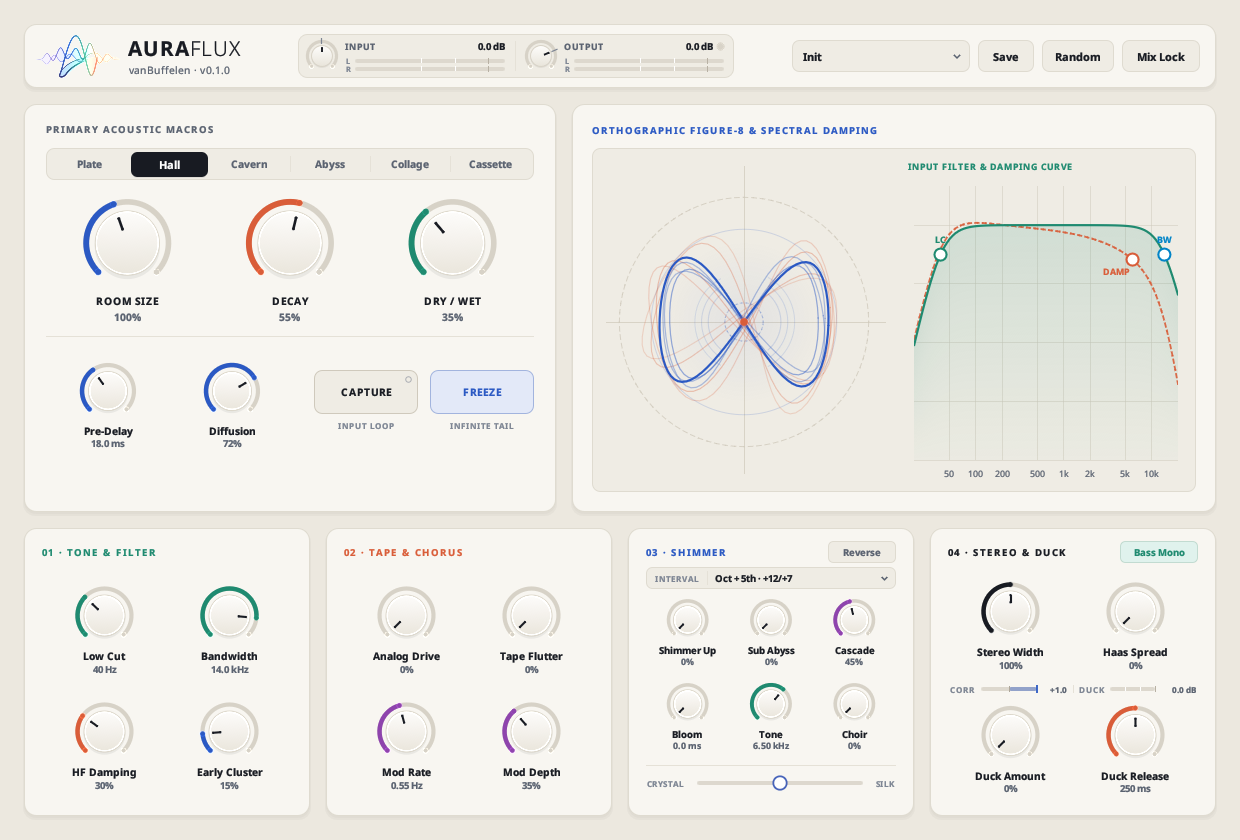
Figure 1.1: Clean Init state — natural Hall, 18 ms Pre-Delay, 40 Hz Low Cut, Bass Mono ON, and zero clutter.
- Ready to mix on load: The default Init setting opens in a natural Hall with sensible Pre-Delay (18 ms), gentle Low Cut (40 Hz), and Bass Mono already switched on — with saturation, tape flutter, shimmer, and choir turned completely down to
0%. - Zero latency & low CPU: AuraFlux reports 0 samples latency for live tracking and stays gentle on your CPU across vocals, drums, guitars, keys, and send buses throughout a full mix.
- No extra cleanup plugins needed: Instead of stacking an EQ, a stereo widener, and a sidechain compressor after your reverb, AuraFlux builds Low Cut, HF Damping, Bass Mono, and Automatic Ducking right into one clear window.
- Grows with your song: Need a tight drum room or crisp vocal plate? Stay in the top-left card and you are done in ten seconds. Need a warm vintage cassette room, a lush chorus cloud, or an infinite choir pad for a bridge? Everything is waiting right below without menu diving.
2. Quick Start: Great Sound in 30 Seconds
- Pick a Space Mode (top-left bar): Choose Plate for upfront vocals and snares, Hall for natural instruments, Collage for lively room texture, or Cassette for warm vintage vibe.
- Set the Space (three large knobs): Adjust Room Size for how big the room feels, Decay for how long the tail lingers, and Dry / Wet for how much reverb blends with your dry sound (
100%if AuraFlux is on a reverb send bus). - Create Front-to-Back Depth: Turn up Pre-Delay (
15–40 ms) to leave a tiny gap before the reverb blooms, keeping vocals and drum hits crisp and upfront. - Shape the Tone: Drag the LC (Low Cut) and DAMP (HF Damping) circles directly on the right-hand graph if the tail feels too boomy or too bright.
- Keep Vocals Clear (Optional): Turn up Duck Amount (bottom-right card) so the reverb automatically steps aside while a singer or soloist is performing, then swells smoothly into the pauses.
💡 Pro Tip — Send Bus Workflow
When using AuraFlux on an aux/send track, set Dry / Wet to 100% and click Mix Lock in the top-right corner. You can now click through all 20 factory presets or press Random freely without ever losing your 100% wet send balance!
3. Single-Screen Interface Overview
Everything in AuraFlux lives on a single 1240 × 840 daylight-clear screen — zero hidden tabs or sub-pages.
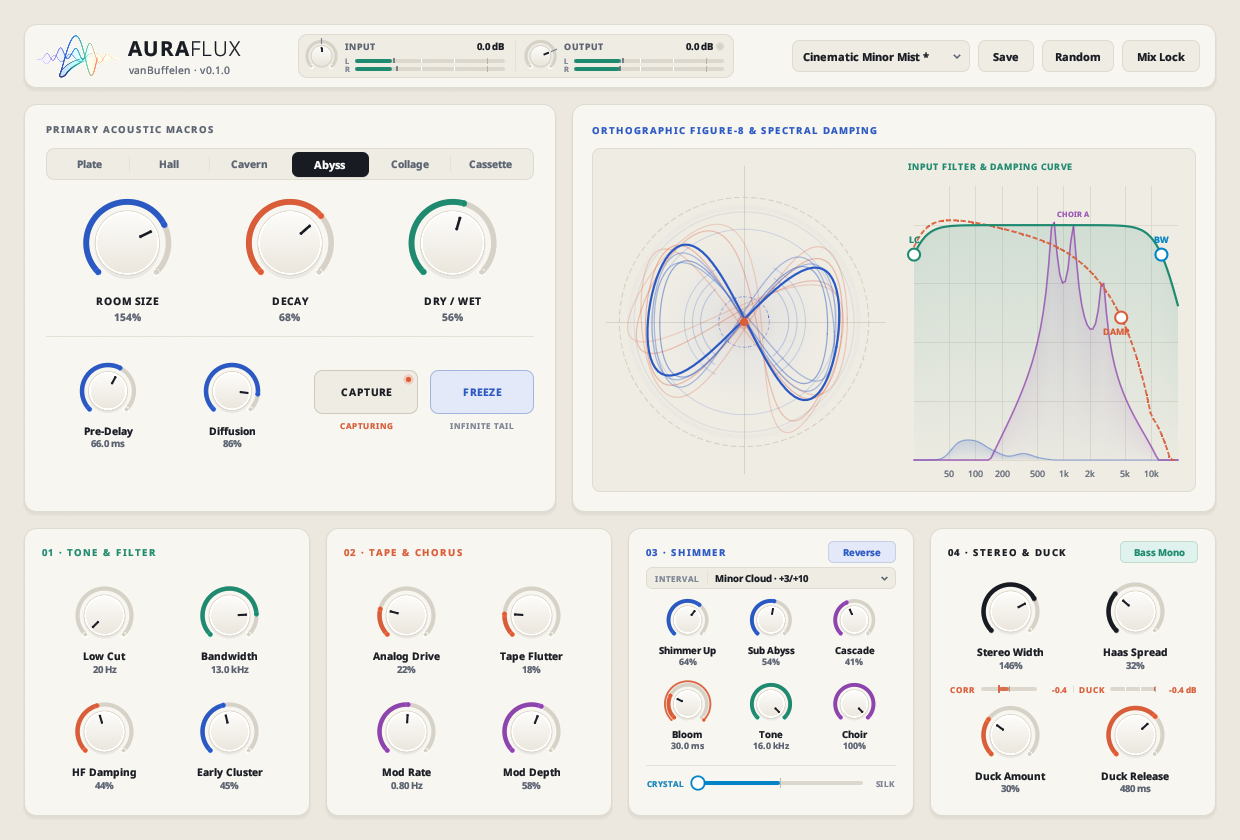
Figure 3.1: Complete single-window architecture — Top I/O & Preset Bar, Primary Macros, Live Spatial Field + EQ Curve, and Four Character Cards.
Top Header Bar
Input & Output level trims with stereo peak meters, clickable clip LED, Preset Browser, Save, Random, and Mix Lock.
Primary Acoustic Macros
Six core Space Modes, main Room Size / Decay / Dry-Wet knobs, Pre-Delay, Diffusion, Capture, and Freeze.
Spatial Field & Tone Graph
Live figure-8 stereo ribbon display paired with draggable LC, BW, and DAMP filter handles + purple Choir curve.
4 Bottom Character Cards
01 · Tone & Filter, 02 · Tape & Chorus, 03 · Shimmer, and 04 · Stereo & Duck.
4. Top Header & Preset Bar

Figure 4.1: Stereo I/O trims, Preset Selector, Save, Random, and Mix Lock.
- Input (
-24 dBto+24 dB): Trims the signal entering AuraFlux alongside a live left/right stereo meter. - Output (
-36 dBto+12 dB): Sets final output volume. If output exceeds0 dB, the clip light next to the readout glows — click the light anytime to clear peak hold. - Preset Selector: Browse Init, 20 Factory Presets, and saved User Presets. An asterisk (
*) marks modified states, and custom presets can be deleted straight from the dropdown. - Save & Logic Pro On-Screen Keyboard: Saves custom presets to disk. On macOS Audio Unit hosts like Apple Logic Pro, GarageBand, and MainStage that hijack computer keys for DAW transport, AuraFlux automatically displays a floating mouse-clickable QWERTY pad so naming presets always works effortlessly.
- Random: Generates a fresh musical space with one click while keeping Freeze and Capture safely untouched.
- Mix Lock: Locks Input, Dry / Wet, and Output across preset browsing and randomization.
5. Primary Acoustic Macros, 6 Space Modes & Smart Capture
For 80% of everyday mixing tasks, the top-left card has everything you need.
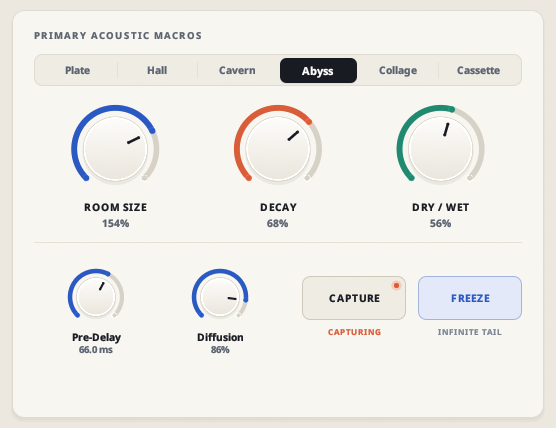
Figure 5.1: Six Space Modes, Room Size, Decay, Dry/Wet, Pre-Delay, Diffusion, Capture, and Freeze.
The Six Space Modes
| Mode | Sound & Character | Everyday & Creative Uses |
|---|---|---|
| Plate | Fast, dense, and silky-bright (83 ms base loop) | Upfront lead vocals, snares, claps, brass, acoustic pop |
| Hall | Natural, balanced, open concert room (261 ms) | Everyday go-to for piano, strings, acoustic guitar, full buses |
| Cavern | Towering, wide, stone-wall grandeur (612 ms) | Slow ballads, pipe organ, cinematic drums, solo guitar swells |
| Abyss | Deep, dark, cavernous horizon (429 ms) | Ambient pads, film scores, bass drones, atmospheric intros |
| Collage | Lively, textured room bounce (242 ms) | Drum rooms, dry synths, plucked instruments, rhythmic percussion |
| Cassette | Cozy, warm, gently aged tape room (132 ms) | Lo-fi keys, indie guitars, intimate bedroom vocals, dusty beats |
Main Space Controls
- Room Size (
25%–200%): Scales tank dimensions smoothly in real time without clicks — from tight studio booth to vast arena above130%. - Decay (
0%–100%): Short settings (20%–40%) add body without clutter; high settings (65%–90%) create enveloping tails. - Dry / Wet (
0%–100%): At0%, your dry signal passes completely uncolored. - Pre-Delay (
0 ms–250 ms): Set between20 msand45 mson vocals so consonants punch through cleanly before the room blooms. - Diffusion (
0%–100%): Higher values (70%+) melt reflections into velvet; lower values (25%–50%) preserve lively rhythmic bounce.
Performance Actions: Capture & Freeze
- Capture (Smart Phrase Loop): Works like a retrospective sustain pedal so you can play melodies over your own harmony. While off, AuraFlux quietly keeps the last
~186 msof played audio ready in memory (LOOP READY once sound arrives). Click Capture right after playing a chord — status switches to LOOP LOCKED (or WAITING AUDIO if silent) and crossfade-loops that musical fragment into the tank with a live loop progress bar inside the button. Click again anytime to fade out cleanly. - Freeze (Infinite Tail): Sustains whatever is ringing inside the reverb tank forever while pausing new audio from entering the frozen cloud — ideal for transitions, intros, and live breakdowns.
6. Visual Acoustic Field & Interactive Tone Graph
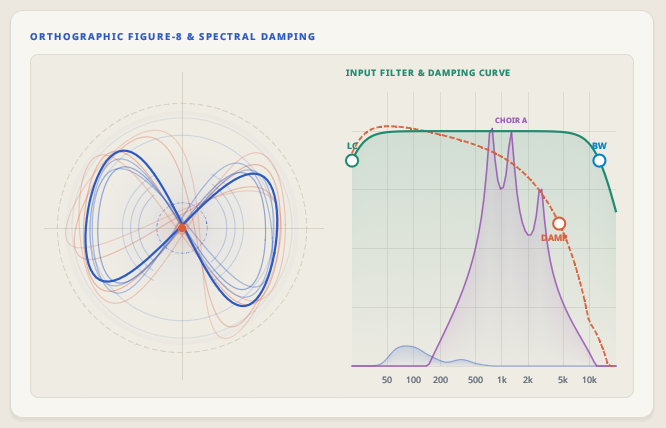
Figure 6.1: Left — Live Figure-8 Stereo Ribbons; Right — Draggable LC, BW, and DAMP handles with Choir formant curve.
Left: Figure-8 Spatial Field
Blue stereo ribbons track real-time width and decay energy. Early reflections ripple from the center, Analog Drive warms the core in amber, Tape Flutter sways the ribbons, upward shimmer adds sparkles, and Sub Abyss grounds the outer ring.
Right: Draggable EQ & Damping
Click and drag LC (green Low Cut), BW (blue Bandwidth), and DAMP (orange HF Damping) directly on the live spectrum canvas — or double-click any handle to reset. Raising Choir reveals the purple CHOIR U / O / A resonance curve.
7. 01 · Tone & Filter + 02 · Tape & Chorus
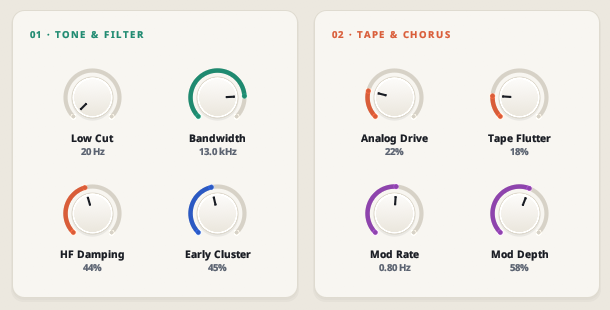
Figure 7.1: Bottom-left cards — Tone & Filter cleanup alongside wet-only Tape & Chorus character.
01 · Tone & Filter
- Low Cut (
20 Hz–1,000 Hz): Try120–250 Hzon vocals, guitars, and snares to keep kicks and basslines crystal clear. - Bandwidth (
1.5 kHz–20 kHz): Lowering to6–9 kHztames hi-hats, vocal sibilance, and buzzy synth leads for classic studio warmth. - HF Damping (
0%–100%): Simulates natural air and curtain absorption as the tail decays. - Early Cluster (
0%–100%): Blends early wall reflections (25%–50%on drums and dry close mics) so instruments sit naturally in physical space.
02 · Tape & Chorus
- Analog Drive (
0%–100%): Warms up the wet reverb path only (dry audio stays 100% untouched).15%–30%helps vocal plates and drum rooms sit forward without extra fader volume. - Tape Flutter (
0%–100%): Organic reel-to-reel pitch wobble — subtle analog motion at8%–20%, dreamy lo-fi warble past60%. - Mod Rate (
0.05 Hz–5.0 Hz) & Mod Depth (0%–100%): Gently swirls tank reflections (try0.3–0.7 Hzat30%–50%) for silky chorus width free of metallic ringing.
8. 03 · Shimmer + 04 · Stereo & Automatic Ducking
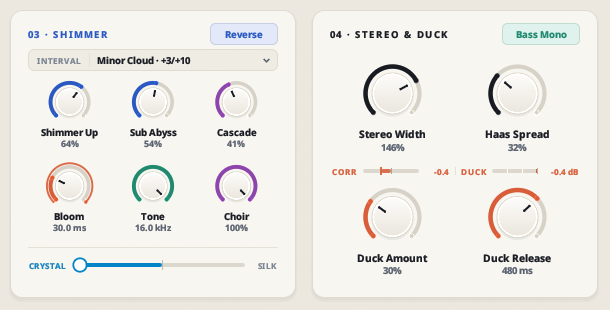
Figure 8.1: Bottom-right cards — 8-interval Shimmer & Choir formants plus Bass Mono, Stereo Width, CORR/DUCK meters, and Automatic Ducking.
03 · 8-Interval Shimmer & Choir
- 8 Harmonic Intervals: Octave (+12), Fifth (+7), Oct + 5th, Double Oct (+12/+24), Sus Fourth (+5/+12), Ensemble (Detune) (everyday secret weapon for lush non-pitched chorus thickening!), Minor (+3/+10), and Major (+4/+11).
- Reverse Badge: Plays shimmer grains backwards to erase sharp pick or key attacks so harmonies swell like bowed velvet.
- Shimmer Up & Sub Abyss: Independently blend upper harmonic voices and deep lower-octave cinematic weight.
- Cascade, Bloom (
0–800 ms) & Tone (1.5–16 kHz): Control harmonic feedback climb, delay shimmer onset with a live amber bloom ring, and smooth high-end brightness. - Choir (
0–100%) & Crystal ↔ Silk Slider: Sculpt shimmer through human-like U → O → A vocal resonances and morph grain texture between articulate sparkle (Crystal) and cloud-like smoothness (Silk).
04 · Stereo Width, Bass Mono & Automatic Ducking
- Bass Mono (ON by default): Centers low reverb frequencies while letting mids and highs spread wide — keeping club systems, headphones, and mono fold-downs tight.
- Stereo Width (
0%–200%) & Haas Spread (0%–100%): Scale from mono focus up to wrap-around panoramic width and blossom mono mics across the stereo field. - Live CORR & DUCK Meters: Monitor real-time phase correlation (staying above
0.0guarantees clean mono translation) and live ducking attenuation in dB. - Duck Amount & Duck Release (
40–1,200 ms): Automatically lowers reverb while dry vocals or leads play, then swells smoothly into pauses (120–250 msfor snappy pop/drums;450–800 msfor lush ballad swells).
9. Five Everyday Studio Mixing Recipes
Dial in reliable studio spaces in seconds using these starting recipes:
1. Clear, Upfront Lead Vocal
Keeps every word intelligible in a dense mix while wrapping the end of each phrase in a warm studio sheen.
2. Tight Snare & Drum Room Glue
Adds realistic studio air and punch to dry drum samples or close mics without washing out the groove.
3. Natural Acoustic Guitar & Piano
An invisible, breathing wooden studio space that makes close-miked instruments sound three-dimensional.
4. Cozy Vintage Keys & Indie Guitar
Warm, nostalgic tape-room depth with gentle reel-to-reel pitch movement that feels lived-in and intimate.
5. Blooming Ambient Swells
Lets your clean guitar or piano attack speak naturally first, then lifts a velvety harmonic choir cloud behind it.
10. All 20 Factory Presets Guide
Everyday Studio Spaces (7)
Binaural Wood Studio (Hall), Concert Symphony Hall (Hall), Nordic Porcelain Plate (Plate), Punchy Drum Chamber (Plate), Lush Chorus Plate (Plate), Ducked Lead Horizon (Hall), and Prism Collage Scatter (Collage).
Warm Tape Rooms (2)
Amber Tape Room (Cassette — cozy saturated studio tape room with zero shimmer) and Warped Cassette Echo (Cassette — deep lo-fi drift with reversed ensemble reflections).
Shimmer, Choir & Soundscapes (11)
Blooming Piano Halo, Symphonic String Bed, Reverse Velvet Swell, Aurora Staircase, Backwards Crystal Cloud, Golden Horizon Major, Cathedral Pipe Organ, Angelic Choir Loft, Monastery Monk Chant, Cinematic Minor Mist, and Tectonic Sub Abyss.
11. Cross-Platform Installation, Preset Paths & Mouse Shortcuts
Linux (x86_64)
Copy AuraFlux.clap to ~/.clap/ and AuraFlux.vst3 to ~/.vst3/.
User Presets: ~/.local/share/auraflux/presets
Windows (x86_64)
Copy AuraFlux.clap to C:\Program Files\Common Files\CLAP\ and AuraFlux.vst3 to C:\Program Files\Common Files\VST3\.
User Presets: %APPDATA%\vanBuffelen\AuraFlux\Presets
macOS Universal2 (Apple Silicon & Intel)
Copy AuraFlux.component (Logic Pro AUv2) to ~/Library/Audio/Plug-Ins/Components/ and AuraFlux.clap to ~/Library/Audio/Plug-Ins/CLAP/, then run once in Terminal:xattr -cr ~/Library/Audio/Plug-Ins/Components/AuraFlux.component
User Presets: ~/Library/Audio/Presets/vanBuffelen/AuraFlux
Mouse Shortcuts
Drag & Scroll Wheel
Drag up/right or roll your mouse wheel / trackpad over any knob or slider for quick nudges.
Shift + Drag
Hold Shift while dragging or scrolling for ultra-fine precision tuning.
Double-Click Reset
Double-click any knob, slider, or graph handle (LC, BW, DAMP) to snap back to its studio default.
12. Complete 32-Parameter Automation Reference
Every parameter exposed for host automation and MIDI learn in AuraFlux:
| ID | Parameter Name | Module | Type | Default | Range | Unit | Description |
|---|---|---|---|---|---|---|---|
| in_gain | Input Level | Header | Knob | 0.0 | -24.0 to +24.0 | dB | Trims stereo signal entering AuraFlux alongside live L/R peak meters. |
| mix | Dry/Wet Mix | Space | Knob | 35.0 | 0% to 100% | % | Balances untouched dry audio (0%) with wet reverb (100%). Protected by Mix Lock. |
| out_gain | Output Level | Header | Knob | 0.0 | -36.0 to +12.0 | dB | Final output trim with clickable >0 dB peak clip indicator. |
| space_mode | Space Mode | Space | Mode Selector | Hall | Plate, Hall, Cavern, Abyss, Collage, Cassette | — | Selects the figure-eight acoustic tank topology and base reflection geometry. |
| freeze | Freeze | Space | Toggle | Off | Off / On | — | Sustains whatever is currently ringing in the tank infinitely while pausing new input. |
| capture | Capture | Space | Toggle | Off | Off / On | — | Retrospective smart phrase loop (~186 ms buffer) with crossfade looping and progress bar. |
| predelay_ms | Pre-Delay | Space | Knob | 18.0 | 0.0 to 250.0 | ms | Inserts a clean gap before reverb onset so vocals and transients stay upfront. |
| size | Room Size | Space | Knob | 100.0 | 25% to 200% | % | Click-free scaling of physical tank dimensions from tight booth to vast arena. |
| decay | Decay | Space | Knob | 55.0 | 0% to 100% | % | Controls how long reflections ring out before fading to silence. |
| diffusion | Diffusion | Space | Knob | 72.0 | 0% to 100% | % | Reflection density from rhythmic bounce (25–50%) to velvety wash (70%+). |
| early_cluster | Early Cluster | 01 · Tone | Knob | 15.0 | 0% to 100% | % | Blends early room boundary reflections for realistic front-to-back proximity. |
| low_cut | Low Cut | 01 · Tone | Knob / Graph LC | 40 | 20 to 1000 | Hz | Removes sub rumble and low-mid mud entering the reverb (green LC handle). |
| bandwidth | Bandwidth | 01 · Tone | Knob / Graph BW | 14.0 | 1.5 to 20.0 | kHz | Input high-frequency roll-off for taming sibilance and harsh highs (blue BW handle). |
| damping | HF Damping | 01 · Tone | Knob / Graph DAMP | 30.0 | 0% to 100% | % | Controls how rapidly high frequencies absorb as the tail decays (orange DAMP curve). |
| analog_drive | Analog Drive | 02 · Tape | Knob | 0.0 | 0% to 100% | % | Wet-only harmonic saturation adding warm body and forward presence without touching dry signal. |
| tape_flutter | Tape Flutter | 02 · Tape | Knob | 0.0 | 0% to 100% | % | Organic reel-to-reel pitch drift and nostalgic tape motion. |
| mod_rate | Mod Rate | 02 · Tape | Knob | 0.55 | 0.05 to 5.00 | Hz | Tank chorus modulation speed to keep long tails lush and non-metallic. |
| mod_depth | Mod Depth | 02 · Tape | Knob | 35.0 | 0% to 100% | % | Intensity of internal stereo chorus swirl inside the reverb tank. |
| shimmer_interval | Shimmer Interval | 03 · Shimmer | Selector | Oct + 5th | Octave (+12), Fifth (+7), Oct + 5th, Double Oct (+12/+24), Sus Fourth (+5/+12), Ensemble (Detune), Minor (+3/+10), Major (+4/+11) | — | Selects harmonic pitch voices or non-shifted Ensemble chorus thickening. |
| shimmer_up | Shimmer Up | 03 · Shimmer | Knob | 0.0 | 0% to 100% | % | Blend level of the upper harmonic or ensemble shimmer voices. |
| shimmer_sub | Sub Abyss | 03 · Shimmer | Knob | 0.0 | 0% to 100% | % | Blends a warm lower-octave foundation beneath the reverb tail. |
| shimmer_tone | Shimmer Tone | 03 · Shimmer | Knob | 6.5 | 1.5 to 16.0 | kHz | Low-pass tone filter smoothing brightness on shimmer voices. |
| shimmer_reverse | Reverse Shimmer | 03 · Shimmer | Toggle Badge | Off | Off / On | — | Plays shimmer grains backwards to erase sharp attacks for bowed velvet swells. |
| shimmer_bloom | Shimmer Bloom | 03 · Shimmer | Knob | 0 | 0 to 800 | ms | Delays shimmer arrival so natural room reflections speak first before the halo rises. |
| shimmer_regen | Shimmer Cascade | 03 · Shimmer | Knob | 45.0 | 0% to 100% | % | Feedback regeneration allowing shimmer voices to climb into evolving harmonic layers. |
| shimmer_texture | Grain Texture | 03 · Shimmer | Slider | 50.0 | 0% (Crystal) to 100% (Silk) | % | Morphs grain character from articulate sparkle (Crystal) to cloud-like smoothness (Silk). |
| shimmer_vowel | Vowel Choir | 03 · Shimmer | Knob | 0.0 | 0% to 100% | % | Sculpts shimmer through human-like U → O → A vocal formant resonances. |
| stereo_width | Stereo Width | 04 · Stereo | Knob | 100.0 | 0% to 200% | % | Adjusts reverb field from focused mono (0%) to panoramic wrap-around stereo (200%). |
| haas_spread | Haas Spread | 04 · Stereo | Knob | 0.0 | 0% to 100% | % | Adds left/right spatial micro-offset so mono sources blossom across stereo speakers. |
| bass_mono | Bass Mono | 04 · Stereo | Toggle Badge | On | Off / On | — | Centers low reverb frequencies for punchy club, headphone, and mono fold-down translation. |
| duck_amount | Duck Amount | 04 · Stereo | Knob | 0.0 | 0% to 100% | % | Automatically lowers reverb while dry notes/lyrics play, shown live on the DUCK meter. |
| duck_release | Duck Release | 04 · Stereo | Knob | 250 | 40 to 1200 | ms | Recovery speed of the reverb tail once dry phrases pause. |