
1. Overview & Vintage Studio Heritage
Compressator is an all-in-one analog channel strip engineered in Rust to deliver the character, transient control, and musical saturation of three legendary studio icons in a single unified workflow:
- Ultra-Fast FET Peak Limiter: Inspired by the iconic UREI 1176LN, featuring feedback detection, microsecond attack times, and the unhinged "All Buttons In" British Mode.
- Smooth Optical Leveling Amplifier: Inspired by the Teletronix LA-2A, featuring physical T4B electro-optical ballistics and asymmetric 12AX7 vacuum tube makeup saturation.
- 15 IPS Reel-to-Reel Tape Machine: Physical magnetic tape emulation with true hysteresis curves, mechanical wow & flutter, 65 Hz head-bump resonance, and intelligent auto-makeup gain compensation.
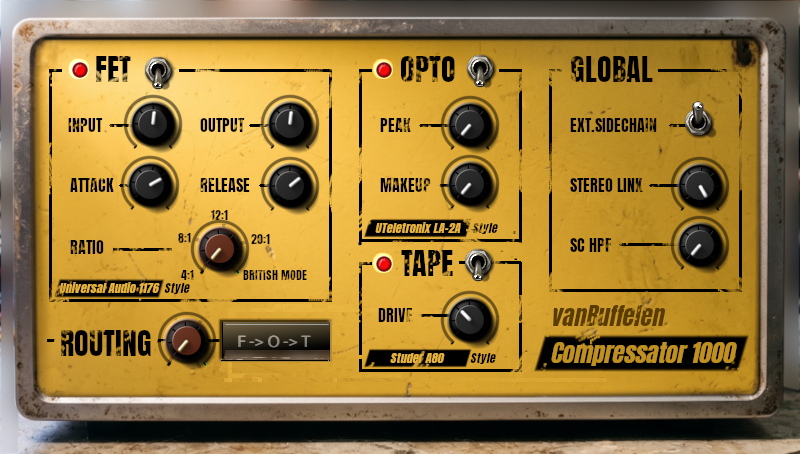
Compressator Channel Strip: FET Limiter, Opto Leveler, 15 IPS Tape Machine, Dynamic Routing Matrix and Master Controls.
Why combine all three into one plugin? In world-class recording studios, engineers rarely rely on a single compressor. The gold standard vocal and drum chain cascades a lightning-fast peak-catcher (FET) into a musical RMS leveler (Opto), printing through a warm reel-to-reel tape deck. Compressator brings that complete vintage chain into your DAW with zero latency phasing and zero routing headaches.
2. Interface Overview & Section Layout
The interface is arranged logically into 5 distinct processing sections:
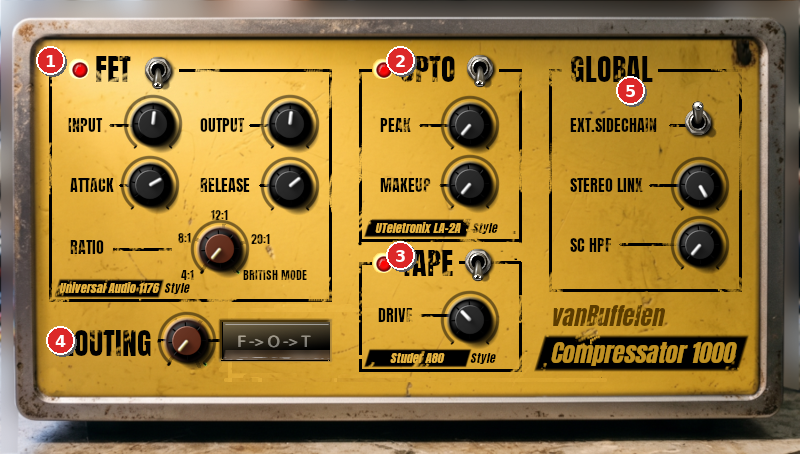
Numbered control sections: 1. FET Peak Limiter • 2. Opto Leveler • 3. Tape Machine • 4. 6-Way Routing Matrix • 5. Master & Sidechain
| # | Section | Core Purpose | Key Controls |
|---|---|---|---|
| 1 | FET Compressor | Ultra-fast peak limiting, transient shaping, aggressive snap & All Buttons In grit | Input, Output, Attack, Release, Ratio Selector |
| 2 | Opto Compressor | Musical T4B leveling, transparent vocal smoothing, warm tube output stage | Peak Reduction, Tube Makeup Gain, Power |
| 3 | Tape Machine | Magnetic tape saturation, 65 Hz head bump, tape compression, auto-makeup | Tape Drive (-12 to +24 dB), Power Switch |
| 4 | Routing Matrix | Instantly reorders the signal path between 6 permutations with real-time LCD readout | Red Rotary Selector, Backlit Status Display |
| 5 | Master Controls | Global sidechain routing, low-cut filter, and detector stereo imaging | Stereo Link (0–100%), SC HPF (20–500Hz), Ext SC Toggle |
3. Module 1: The FET Compressor (Peak Limiter)
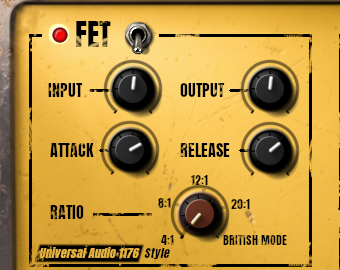
FET Peak Limiter Module with Red Ratio Selector, Vintage VU Meter & Dual-Stage Release.
The FET Compressor models field-effect transistor peak limiters known for aggressive, biting character and microsecond response times. It operates on a vintage feedback topology: the sidechain detector reads the audio signal after gain reduction has been applied, yielding responsive, musical compression that naturally clamps down on runaway transients.
FET Controls Breakdown
- Power Switch & Indicator LED: Toggles the FET module in or out of the audio path. Bypassing disables processing with zero latency overhead.
- Input Gain (
fet_in, -24.0 dB to +24.0 dB): The FET circuit utilizes a fixed internal threshold (-24 dB). Turning Input clockwise pushes more signal across the threshold, deepening compression. - Output Gain (
fet_out, -24.0 dB to +24.0 dB): Clean make-up gain to compensate for volume reduction caused by heavy compression. - Attack (
fet_attack, 20 µs to 800 µs): Controls how quickly the gain reduction circuit catches transients. Fast attack (far right / 20–100 µs) grabs peaks instantly; slower attack (far left / 400–800 µs) lets the initial transient punch (drum stick click or guitar pick) through. - Release (
fet_release, 50 ms to 1100 ms): Controls envelope recovery. Features dual-stage program-dependent recovery: brief transients release rapidly, while sustained, heavily compressed passages release smoothly. - Ratio Selector (
fet_ratio): 5-position switch:4:1(moderate leveling),8:1(transient control),12:1(heavy compression),20:1(brickwall peak limiting), andAll Buttons In.
🔥 Secret Weapon: "All Buttons In" (British Mode)
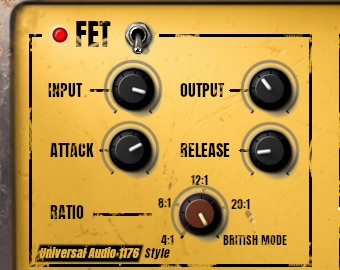
Turning the red Ratio knob fully clockwise activates the legendary "All Buttons In" (ABI) mode. On vintage hardware, pressing all ratio buttons shifted circuit bias voltages. Compressator meticulously models this phenomenon:
- The detector slope jumps to 49.0: Yields extreme, non-linear brickwall compression with explosive harmonic saturation.
- Doubled attack time lag: Allows initial transient crack to slip through completely unhindered before the ceiling slams down.
- Halved primary release time: Causes the audio sustain to aggressively suck back up and pump in a rhythmic, exciting wave.
Pro Tip: Use All Buttons In on parallel drum busses, rock room mics, or industrial bass for instant grit, energy, and attitude!
4. Module 2: The Opto Compressor (Optical Leveler)
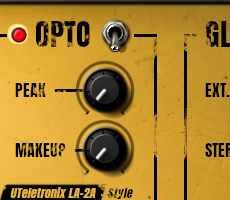
Opto Leveler Module modeled after the classic T4B electro-optical attenuator with virtual tube amplification.
The Opto Compressor models the revered electro-optical leveling amplifier. At its core is an authentic simulation of the T4B optical attenuator: an electroluminescent panel shining upon a light-dependent photo-resistor.
Because physical light panels and photo-resistors exhibit natural inertia, the optical compressor does not react instantly like a FET. Instead, it provides a gentle soft-knee compression curve (10 dB transition band) and an organic two-stage release:
- Initial Fast Drop: The first 50% of gain recovery occurs briskly (~60 ms).
- Slow Memory Tail: The remaining 50% decays gradually over 1.5 to 2.0 seconds as the virtual luminescent panel fades out.
This program-dependent response is why optical compressors sound virtually transparent on vocals and bass, smoothing dynamic swings without ever choking the life out of a performance.
Opto Controls Breakdown
- Peak Reduction (
opto_peak, 0.0 dB to 40.0 dB): Controls how intensely the sidechain drives the virtual T4B optical cell. At 0 dB, audio passes uncompressed. Turning up progressively levels the audio. - Makeup Gain (
opto_makeup, 0.0 dB to 24.0 dB): Amplifies the compressed audio to restore level or push the virtual tube output stage.
💡 Virtual 12AX7 / 6AQ5 Vacuum Tube Output Stage
Compressator doesn't just model the optical cell; it also models the vintage vacuum tube line amplifier that drives the output. The tube stage implements an asymmetric rational wave-shaping transfer function. As you increase Makeup Gain, signal peaks encounter soft asymmetric clipping that enriches your audio with musical even-order harmonics, producing a warm, velvety tube glow.
5. Module 3: The 15 IPS Tape Machine
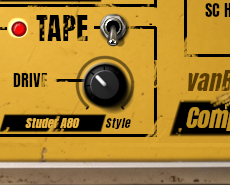
Vintage 15 IPS Tape Machine with magnetic hysteresis saturation and auto-makeup compensation.
The Tape Machine module simulates a high-end 15 IPS (inches per second) reel-to-reel studio mastering recorder. Magnetic tape is celebrated for its ability to "glue" tracks together, tame harsh high-frequency spikes, and impart weight and punch to the low end.
Tape Controls & Intelligent Auto-Makeup
- Tape Drive (
tape_drive, -12.0 dB to +24.0 dB): Drives the audio signal into the virtual magnetic oxide ribbon.- -12 dB to 0 dB: Extremely clean, subtle analog warmth and tape EQ contouring.
- +1 dB to +8 dB: Classic analog tape compression, softening transient spikes and gluing the track.
- +9 dB to +24 dB: Thick, rich magnetic saturation and harmonic distortion.
⚙️ Under the Hood: Hysteresis, 65 Hz Head-Bump & Auto-Makeup
- Intelligent Auto-Makeup Gain Compensation: On standard tape plugins, cranking the drive makes the track painfully loud. Compressator features built-in auto-makeup compensation (
1.25 / drive^0.85). As you push drive harder, the output level automatically scales so you audition harmonic saturation without loudness bias! - Magnetic Hysteresis Saturation: Simulates how magnetic dipole domains retain charge, generating gentle asymmetric saturation modeled via hyperbolic tangent math (
tanh). - Mechanical Wow & Flutter: Dual-LFO micro-pitch modulation (0.33 Hz motor wow and 4.2 Hz capstan flutter).
- The 65 Hz Head-Bump: Replicates physical magnetic playback head-gap resonance (+2.5 dB peaking filter at 65 Hz), giving kick drums and bass immense weight.
- 14 kHz High-Frequency Soft Roll-off: Naturally rounds off harsh digital high frequencies.
- Subsonic 10 Hz DC Blocker: Cleans up asymmetric magnetic DC offsets.
6. Dynamic Routing Matrix (6-Way Signal Flow)
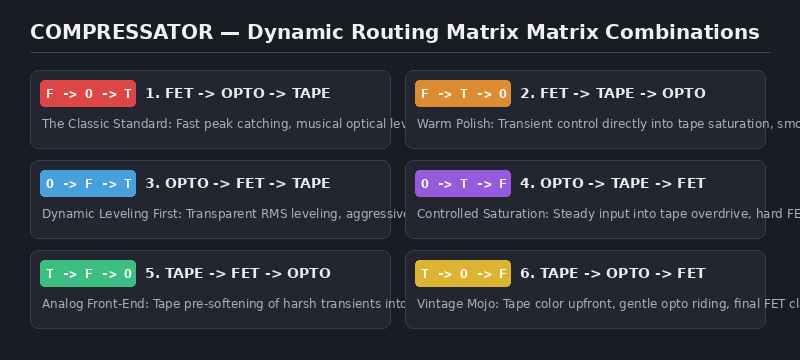
The 6 available signal path permutations, selectable on the fly via the red rotary switch.
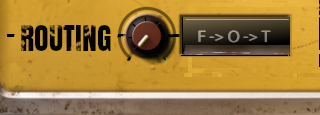
Red rotary routing knob and backlit LCD display protected under a vintage glass lens.
Unlike fixed analog channel strips, Compressator features an internal crossfading matrix that lets you switch between 6 distinct module orders in real time with zero clicks or phase issues:
| Order | Scheme | Best Used For | Why It Works |
|---|---|---|---|
| 1 | F → O → T (Default) | Lead Vocals, Snare, Full Drum Bus, Bass | Fast FET catches sudden spikes → Opto smoothly rides the body → Tape glues the entire track together. |
| 2 | F → T → O | Electric Guitars, Rock Vocals, Brass | FET clamps peaks before tape saturation → Tape adds warm color → Opto levels the saturated tone. |
| 3 | O → F → T | Acoustic Guitar, Dynamic Vocals, Piano | Opto acts like an automated fader rider → FET acts as safety net for rogue peaks → Tape adds analog depth. |
| 4 | O → T → F | EDM Synths, Aggressive Pop/Rap, Rock Bass | Opto drives tape consistently for predictable saturation → FET sits at end as brickwall ceiling or punch enhancer. |
| 5 | T → F → O | Bright/Digital Tracks, Overheads, Synth Leads | Tape softens harsh digital transients right at input → Compressors react to a warmer, thicker waveform. |
| 6 | T → O → F | Retro Soul, Jazz, Funk, Ambient Room Mics | Full vintage tape tone up front → Transparent optical leveling → Final FET peak control. |
7. Master Controls & Sidechain Section
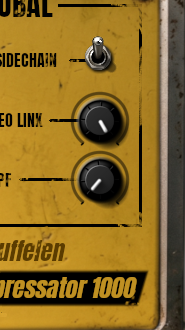
Stereo Link (0–100%), Sidechain High-Pass Filter (20–500Hz) and External Sidechain toggle switch.
Located on the right edge of Compressator, these controls govern how the compressors listen and react to incoming audio:
- Stereo Link (
stereo_link, 0% to 100%):- 100% (Fully Linked): Detectors for Left and Right channels share gain reduction (
max(L, R)). Prevents stereo image shifting. Essential for mix busses, drum overheads, and master faders. - 0% (Dual Mono Unlinked): Left and Right channels compress independently. Maximizes stereo width on wide synth pads, dual-miked acoustic guitars, and ambient room tracks.
- Values in between (1% to 99%): Smoothly blends between unlinked and linked behavior.
- 100% (Fully Linked): Detectors for Left and Right channels share gain reduction (
- Sidechain High-Pass Filter (
sc_hpf, 20 Hz to 500 Hz):- 12 dB/octave Butterworth biquad filter. Dial up to 80–150 Hz to prevent heavy kick drums or sub-bass notes from suffocating the compressor. Lows pass through punchy and uncompressed!
- Transparent 20 Hz Bypass: Fully bypassed internally at 20 Hz for zero phase shift.
- External Sidechain (
ext_sidechain, On / Off):- Switches the FET and Opto detectors from listening to the track audio to listening to an Auxiliary Sidechain input bus sent from another track (e.g. Kick drum ducking Bass).
8. Audio Engine, Latency & 2x Oversampling
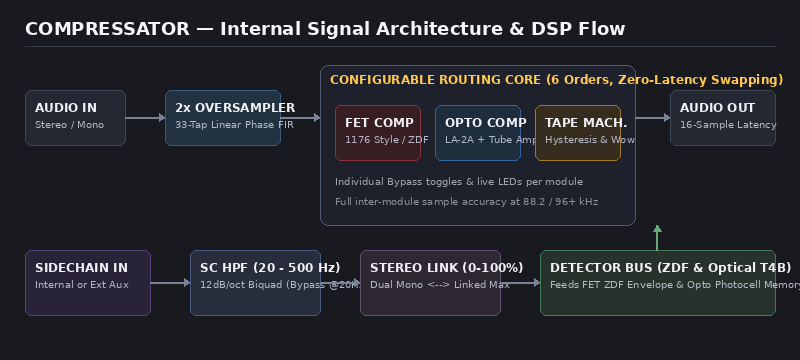
Linear-phase polyphase FIR 2x oversampling engine with dynamic routing matrix and zero phase distortion.
🎯 2x Polyphase FIR Oversampling
Analog saturation produces high-frequency harmonics that can reflect backward as harsh digital aliasing distortion. Compressator doubles internal sample rate with a custom 33-tap linear-phase polyphase FIR filter (Blackman-Harris window), pushing aliasing out of the audible spectrum.
⏱️ 16-Sample PDC Latency
The 2x oversampling filter introduces an ultra-low latency of exactly 16 samples (~0.33 ms at 48 kHz). Compressator automatically reports this to your DAW's Plugin Delay Compensation engine, guaranteeing sample-accurate parallel processing.
✨ Zero Phase Distortion
Linear-phase FIR filters guarantee that all frequency components pass through with exact phase alignment, preserving crisp transient impact and deep, punchy low-end definition.
🎚️ Sample-Accurate Smoothing
All continuous controls incorporate internal parameter smoothing to eliminate zipper noise, clicks, or clicks during high-speed automation sweeps.
9. Pro Mixing Recipes & Presets
Try these tested, real-world starting configurations to dial in legendary tones in seconds:
Recipe 1: Lead Vocal Magic
FET -> OPTO -> TAPE (F -> O -> T)The gold standard studio vocal chain: FET catches wild transient consonants, Opto provides buttery RMS leveling, and Tape glues everything into the track.
Recipe 2: Punchy In-Your-Face Snare
FET -> TAPE -> OPTO (F -> T -> O)Slower attack allows the initial stick crack through before clamping. Tape rounds off sharp spikes and adds low-end 65 Hz head bump.
Recipe 3: Drum Room & Parallel Smash
OPTO -> TAPE -> FET (O -> T -> F)Extreme 'All Buttons In' British mode on parallel drum room mics creates rhythmic, explosive pumping and monstrous ambient sustain.
Recipe 4: Rock & Funk Bass Lock
OPTO -> FET -> TAPE (O -> F -> T)Opto levels out uneven fingerpicking dynamics, while FET catches sudden thumb slaps. Tape adds bottom-end weight at 65 Hz.
Recipe 5: Mix Bus / Mastering Analog Glue
FET -> OPTO -> TAPE (F -> O -> T)Transparent analog polish across an entire mix. Gentle optical touch with 15 IPS tape rounding off digital harshness.
Recipe 6: Electronic Kick-to-Bass Ducking
FET -> OPTO -> TAPE (F -> O -> T)Clean, rhythmic ducking triggered by an external kick drum send. Fast attack clears room instantly for the kick transient.
10. DAW Routing & External Sidechain Setup
Compressator publishes an auxiliary sidechain input bus named "Sidechain". Follow these simple steps in your DAW:
Bitwig Studio
- Insert Compressator onto your destination track (e.g. Bass).
- In Bitwig's device header, click the sidechain / auxiliary input selector.
- Select your trigger track (e.g. Kick).
- On Compressator, flip the EXT SC switch to ON.
Ableton Live
- Insert Compressator onto your target track.
- Click the small triangle in the plugin device window header to expand the sidechain routing menu.
- Enable Sidechain and select your trigger track (e.g. Kick).
- On Compressator, flip EXT SC to ON.
Reaper
- Drag the routing cable from your trigger track (Kick) onto the Compressator FX window.
- Map channels 1/2 of the trigger track to auxiliary input channels 3/4 of Compressator.
- On Compressator, flip EXT SC to ON.
FL Studio
- In the Mixer, select your trigger track (Kick). Right-click the destination track (Bass) send arrow and select "Sidechain to this track".
- Open Compressator, click the gear icon (Wrapper Settings) > Processing > Connections, and map the sidechain input.
- Flip Compressator's EXT SC switch to ON.
11. Troubleshooting & FAQ
Q: Why is Compressator not compressing when audio is playing?
Both the FET and Opto compressors feature fixed internal thresholds (-24 dB). If your audio tracks are recorded at low levels (peaks below -24 dBFS), audio will not cross the threshold. For FET, turn up Input Gain (fet_in); for Opto, turn up Peak Reduction (opto_peak).
Q: Why doesn't the volume jump when I crank Tape Drive?
Compressator features an intelligent Auto-Makeup Gain Compensation circuit. As you push Tape Drive higher, output level is automatically scaled down so you can evaluate magnetic saturation without volume bias.
Q: How do I achieve aggressive grit and industrial distortion?
Set Routing to TAPE -> FET -> OPTO or OPTO -> TAPE -> FET. Crank Tape Drive to +18 dB or +24 dB, engage the FET on All Buttons In, and turn FET Input Gain up.
Q: What do the LCD abbreviations mean?
F = FET Peak Limiter • O = Opto Leveling Amplifier • T = 15 IPS Tape Machine. The arrows indicate the exact chronological order of audio processing.
Q: Is there any latency for live recording?
Processing latency is only 16 samples (~0.33 ms at 48 kHz). This is practically imperceptible and fully suitable for real-time tracking of live vocals, bass, or guitars.
12. Complete Parameter Reference Table
Search and filter all 15 Compressator parameters below:
| ID | Name | Module | Type | Default | Range / Values | Unit | Description |
|---|---|---|---|---|---|---|---|
fet_enabled | FET Enabled | FET | Toggle | On | On / Off | — | Hardware bypass switch for FET compressor module. |
fet_in | FET Input Gain | FET | Knob | 0.0 | -24.0 to +24.0 | dB | Input gain driving signal into the fixed -24 dB internal threshold. |
fet_out | FET Output Gain | FET | Knob | 0.0 | -24.0 to +24.0 | dB | Clean makeup gain to compensate for peak gain reduction. |
fet_attack | FET Attack | FET | Knob | 0.0002 | 0.00002 to 0.0008 (20µs – 800µs) | s | Transient response speed: fast (right) or punchy punch-through (left). |
fet_release | FET Release | FET | Knob | 0.250 | 0.050 to 1.100 (50ms – 1.1s) | s | Dual-stage release recovery time with secondary capacitor memory. |
fet_ratio | FET Ratio Selector | FET | Red Knob | 4:1 | 4:1, 8:1, 12:1, 20:1, All Buttons In | — | Compression ratio selector and British Mode (All Buttons In) activator. |
opto_enabled | Opto Enabled | Opto | Toggle | On | On / Off | — | Hardware bypass switch for Opto compressor module. |
opto_peak | Opto Peak Reduction | Opto | Knob | 0.0 | 0.0 to 40.0 | dB | Drives signal into virtual T4B optical cell. Higher values increase leveling. |
opto_makeup | Opto Makeup Gain | Opto | Knob | 0.0 | 0.0 to 24.0 | dB | Output amplifier stage modeled on 12AX7/6AQ5 vacuum tubes with warm even harmonics. |
tape_enabled | Tape Enabled | Tape | Toggle | On | On / Off | — | Hardware bypass switch for 15 IPS Tape Machine module. |
tape_drive | Tape Drive | Tape | Knob | 0.0 | -12.0 to +24.0 | dB | Magnetic oxide saturation with intelligent auto-makeup gain compensation. |
routing | Routing Matrix | Master | Red Knob | F -> O -> T | 6 Permutations (F-O-T, F-T-O, O-F-T, O-T-F, T-F-O, T-O-F) | — | Signal chain processing order with instant, glitch-free crossfade. |
stereo_link | Stereo Link | Master | Knob | 100.0 | 0.0 to 100.0 (Dual Mono to Linked) | % | Sidechain detector link: 0% maximizes stereo width; 100% locks center image. |
ext_sidechain | External Sidechain | Master | Toggle | Off | On / Off | — | Switches detector input to DAW auxiliary sidechain input bus for ducking. |
sc_hpf | Sidechain HPF | Master | Knob | 20.0 | 20.0 to 500.0 (Bypassed at 20 Hz) | Hz | 12 dB/octave low-cut filter preventing sub-bass from over-triggering compression. |