
📖 Table of Contents (Tap to Navigate)▼
1. Introduction & The Concept
Welcome to Morpherb, a generative sound-shaping space and granular fractal reverb created for adventurous sound designers, film composers, and electronic music producers.
Most digital reverbs are built with the singular goal of simulating polite acoustic reflections: small studios, wooden halls, or stone cathedrals. Morpherb rejects this convention entirely.
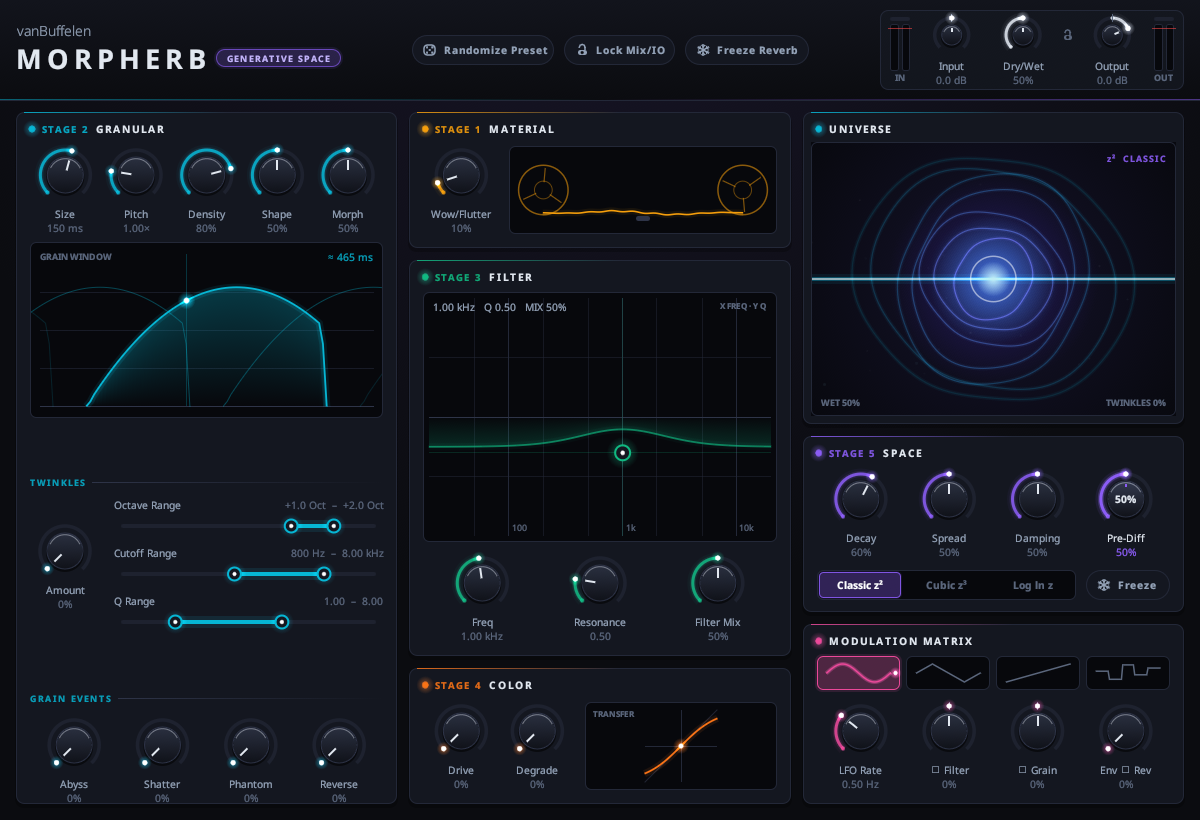
Figure 1.1: Complete Morpherb GUI with real-time telemetry, 2D filter pad, and granular controls.
Instead of static acoustic impulse responses, Morpherb treats audio space as an unstable, evolving ecosystem:
- Continuous Tape Memory: Incoming audio is continuously laid down onto an internal 4-second magnetic tape buffer with adjustable mechanical wow and flutter.
- Parallel SIMD Granulation: 8 independent audio grain streams are generated simultaneously via AVX vector operations, with continuous control over size, pitch transposition, morphing, and window geometry.
- Crystalline Octave Twinkles: High-resonance bandpass sparkle filters cluster across harmonic octaves (+1 to +4), producing angelic shimmer halos without unnatural digital pitch artifacts.
- 2D Resonant Filter: A 2-pole State Variable Filter with an intuitive XY touch pad for simultaneous cutoff and Q manipulation.
- Analog Preamp Drive & 12-Bit Degrade: Non-linear saturation and sample rate decimation inject vintage grit before the reverb tank.
- 16-Delay Prime Feedback Space: 16 delay lines tuned to mathematically prime ratios (31 to 347 samples) with 4 allpass pre-diffusers eliminate metallic comb flutter, featuring Classic, Cubic, and Logarithmic fractal spacing.
- Infinite Freeze Latch: Locks feedback at 100% to create perpetual, non-decaying ambient drones you can play live instruments over.
2. Quick Controls & Mouse Gestures
🖱️ Drag Up/Down
Click and drag vertically on any knob, slider, or parameter to adjust values smoothly.
⌨️ Shift + Drag
Hold down the Shift key while dragging for ultra-fine micro-adjustments.
⚡ Double Click
Double-click any knob or slider to instantly snap it back to its factory default value.
🔴 Clip LED Reset
Click the red clip light above the peak meters to clear peak-hold clipping warnings.
3. Master I/O & Header Strip

Figure 3.1: Master gain staging, randomize button, lock toggle, freeze switch, and peak meters.
The top header bar provides essential master controls that govern overall signal level, randomization behavior, and freeze state:
- Input Level (-24.0 dB to +24.0 dB): Controls the amplitude of incoming audio entering the tape buffer. Higher input drive pushes Stage 4 saturation harder.
- Dry/Wet Mix (0.0% to 100.0%): Clean, click-free equal-power crossfade. Set to 100% when loading Morpherb on a DAW aux return/send track.
- Output Level (-36.0 dB to +12.0 dB): Post-processing makeup gain to compensate for high resonance peaks or dense feedback decay.
- 🎲 Randomize Preset: Intelligently randomizes grain size, pitch, twinkles, filter coordinates, and space decay to instantly spawn brand-new musical presets.
- 🔒 Lock Mix / IO: When turned on, clicking Randomize only affects sound design parameters; your Input Level, Dry/Wet Mix, and Output Level remain untouched.
- ❄️ Freeze Reverb: Latches the feedback loops of Stage 5 into an infinite loop. Notes stop decaying, turning the room into an endless ambient drone.
4. Signal Flow Architecture
Every audio sample flows through a deterministic, ultra-fast 5-stage sequential DSP chain:
Sequential 5-Stage Processing Chain
5. Stage 1: Material (Tape Buffer)
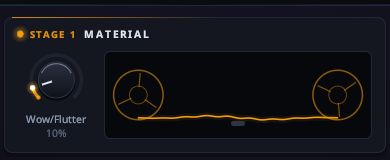
Figure 5.1: Stage 1 Material panel with spinning reel tape visualizer and Wow/Flutter control.
Unlike purely digital reverbs that record into pristine, sterile RAM buffers, Stage 1 models a physical 4-second magnetic reel-to-reel tape recorder:
- Continuous Writing Memory: Stores 4 seconds of stereo history, creating a pool of sonic material for the granular engine to draw from.
- Wow & Flutter (0% to 100%): Simulates mechanical tape capstan speed drift. Low values (5%–15%) produce an organic analog chorus and gentle stereo width; medium values (25%–50%) deliver authentic worn cassette tape pitch drift; extreme values (60%–100%) evoke seasick, haunted tape warbles.
- Animated Reels: The dual tape reels spin in real time, reacting dynamically to tape motor speed and modulation drift.
6. Stage 2: Granular Engine & Twinkles
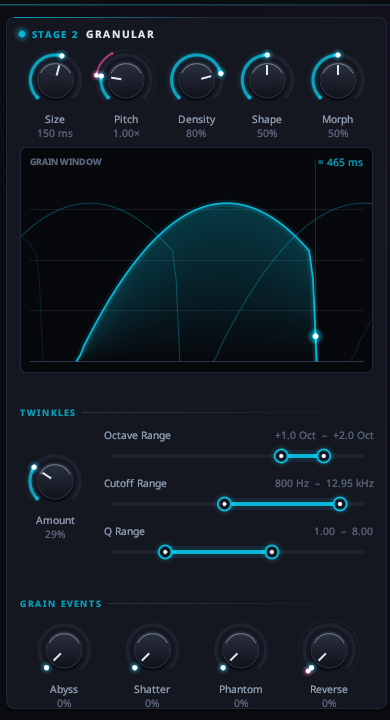
Figure 6.1: Stage 2 Granular engine, grain window preview, twinkle sliders, and special event knobs.
Stage 2 reads audio from the Stage 1 tape buffer and shreds it into 8 independent, simultaneous grain streams using 8-wide AVX/SSE vector instructions.
Core Granular Knobs
- Grain Size (10 ms – 1000 ms): Sets the physical duration of each audio grain. Short values (10–40ms) yield buzzy, metallic timbres; long values (300–1000ms) produce smooth, overlapping cloud textures.
- Grain Pitch (0.25x – 4.00x): Resampling playback speed. 0.50x is one octave down (-12 st), 1.00x is unison, 2.00x is one octave up (+12 st), and 4.00x is two octaves up (+24 st).
- Grain Density (10% – 100%): How frequently grains are birthed. Low settings sound like sparse raindrops; high settings form an impenetrable sonic mist.
- Grain Shape (0% – 100%): Adjusts window envelopes from smooth Hann raised cosines (soft blending) to sharp Tukey trapezoids (punchy transients).
- Grain Morph (0% – 100%): Dynamically links grain length and pitch spread to the active reverb decay size, allowing grains to stretch naturally as the room expands.
Twinkles: Crystalline Octave Harmonics
The Twinkles engine extracts stochastic grains and routes them through specialized resonant bandpass filters pitched to musical octave intervals:
- Twinkles Amount (0% – 100%): Overall probability and volume of sparkle grains.
- Octave Range (+1.0 to +4.0): Dual-thumb slider setting the minimum and maximum octave jumps. Grains randomly select octave harmonics within this window.
- Cutoff Range (200 Hz – 20 kHz): Dual-thumb slider defining the resonant frequency window for the sparkle filters.
- Q Range (1.0 – 20.0): Sets the resonance sharpness of the twinkles, producing singing chime overtones.
Special Stochastic Events
🌊 Abyss Rumble
Injects deep, 0.25x pitch-dropped sub-bass grains with low-pass filtering, creating seismic subterranean thunder.
⚡ Shatter Glitches
Truncates grains to micro-durations (1ms–5ms), producing digital clicks, vinyl static dust, and crackles.
👻 Phantom Swells
Grains with inverted, exponential attack envelopes that swell mysteriously out of nowhere.
🔄 Reverse Chance
Stochastic probability of grains playing backwards in time through the tape memory.
7. Stage 3: State Variable Resonant Filter (2D Pad)
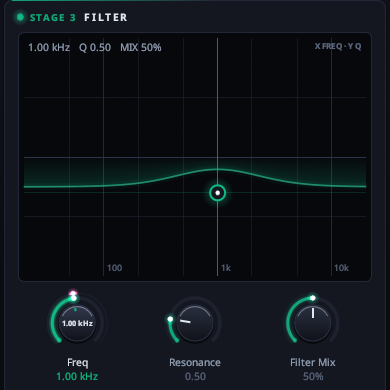
Figure 7.1: Stage 3 Filter featuring the interactive 2D XY cutoff & resonance touch pad.
Before reaching the reverb tank, granulated audio passes through a warm, analog-modeled 2-pole State Variable Filter (SVF):
- Interactive 2D XY Pad: Click and drag the glowing cursor to simultaneously sculpt tone:
- Horizontal Axis (X): Frequency cutoff from dark low-pass (20 Hz) to ultra-bright (20 kHz).
- Vertical Axis (Y): Resonance Q factor from gentle (0.5) to self-oscillating peak resonance (10.0).
- Filter Mix (0% – 100%): Seamlessly blends between the direct granular sound (0%) and the resonant filter tone (100%).
8. Stage 4: Color (Tape Drive & Degrade)
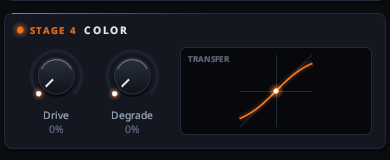
Figure 8.1: Stage 4 Color panel with analog preamp Drive, digital Degrade, and transfer function curve.
Stage 4 injects analog harmonic saturation and vintage digital crunch into the signal before the reverb space:
- Tape Drive (0% – 100%): Models an overdriven tape head preamp with soft hyperbolic tangent (`tanh`) saturation. Adds musical warmth and rounds off harsh high-frequency spikes.
- Degrade (0% – 100%): Continuously reduces sample rate and bit depth. Low settings reproduce the punchy character of late-80s 12-bit rack samplers; high settings create aggressive digital aliasing and lo-fi robotic grit.
- Live Transfer Curve: Displays the actual wave-shaping transfer curve in real time, illustrating saturation soft-knee compression and digital bit stepping.
9. Stage 5: Space (16-Prime Diffuse Reverb)
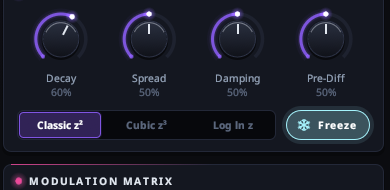
Figure 9.1: Stage 5 Space panel with decay, spread, damping, pre-diffusion, and fractal modes.
Stage 5 is a Feedback Delay Network (FDN) engineered with 16 parallel delay lines tuned to mathematically prime ratios:
16 Prime Numbers Delay Tuning (Samples)
Because prime numbers share no common divisors, this topology completely eradicates harmonic overlap, flutter echoes, and boxy comb filtering.
- Space Decay (0% – 100%): Reverb tail length, from tight 0.5s rooms to 15s+ cavernous tails.
- Space Spread (0% – 100%): Stereo cross-mixing width. At 0%, reflections collapse to focused mono; at 100%, cross-feedback produces an ultra-wide binaural soundstage.
- Space Damping (0% – 100%): High-frequency shelving damping filter inside the feedback loop, simulating wall absorption and air dissipation.
- Pre-Diffusion (0% – 100%): Four nested allpass filters (7.3ms to 27.7ms) that smear sharp transients into silky clouds before entering the main delays.
- Fractal Mode Selector:
- Classic: Mathematically uniform prime spacing for natural acoustic instruments and vocals.
- Cubic: Non-linear cubic delay growth introducing swirling motion into long decays.
- Logarithmic: Sparse early reflections followed by exponential clustering for deep, cavernous spaces.
- Freeze Button: Latches feedback loops at 100% recirculation, creating a non-decaying sound pad.
10. Modulation Matrix & Dynamic Envelope
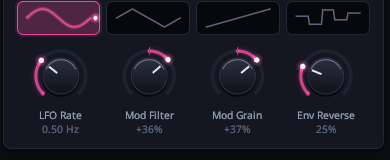
Figure 10.1: Multi-waveform LFO modulation engine and dynamic envelope follower.
To ensure textures evolve organically over time, Morpherb includes a dedicated modulation matrix:
- Waveforms: Select between Sine (smooth), Triangle (linear), Sawtooth (ramp & drop), or Random (Sample & Hold drift).
- LFO Rate (0.1 Hz – 20.0 Hz): From slow 10-second sweeps to rapid audio-rate vibrato oscillations.
- Mod -> Filter (-1.0 to +1.0): Bipolar routing of the LFO to the Stage 3 Filter Cutoff. Positive sweeps upward; negative sweeps downward.
- Mod -> Grain (-1.0 to +1.0): Bipolar routing to Granular Pitch for dynamic chorus detuning and pitch glides.
- Env -> Reverse (0% – 100%): Dynamic peak envelope follower. When loud audio transients are detected, it spikes the Reverse Chance parameter, triggering reverse grain bursts on heavy drum hits or synth stabs.
11. Real-Time Universe Visualizer
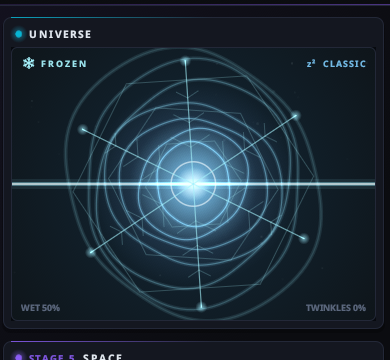
Figure 11.1: Universe Visualizer rendering orbital rings, tape undulation, and sparkle particle flares.
The Universe Visualizer provides instantaneous hardware-accelerated feedback on internal DSP states:
- Orbital Rings: Reflect the active Space Decay, Spread, and Fractal Mode geometry.
- Central Waveform: Renders incoming audio and undulates in real time with Wow/Flutter speed variations.
- Twinkle Particle Stars: Flash golden spark flares whenever high-octave sparkle grains trigger.
- Abyss Pulse: Low subterranean bass rumbles generate deep violet background flares.
- Crystalline Freeze Pattern: Locks into an icy geometric crystal formation when Freeze is active.
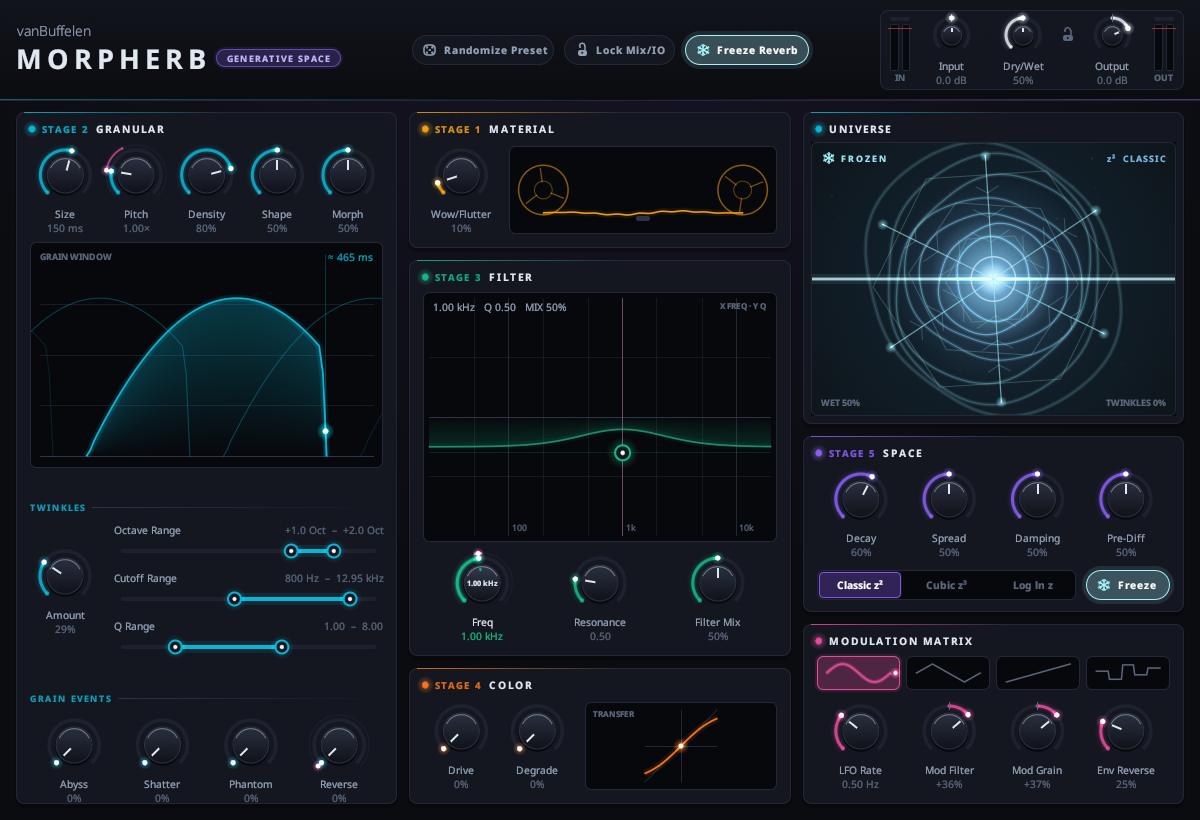
Figure 11.2: Morpherb in active Freeze state with cyan crystallography pattern.
12. Pro Sound Design Recipes & Presets
Use these tested recipes as starting points for various production scenarios:
Recipe 1: Crystalline Ambient Shimmer
A shimmering halo of octave-up sparkle grains floating on top of a warm, expansive hall. Perfect for electric guitars, Rhodes pianos, and slow synthesizer chords.
Recipe 2: Vintage VHS Tape Ghost
Degraded, warbly cassette tape flutter with reverse swells, 12-bit crunch, and dark cubic decay reflections. Instantly imparts authentic 1980s nostalgia.
Recipe 3: Dark Sub-Abyss Glitch Hall
Thunderous low-end sub rumbles paired with sharp digital static, harsh tape drive, and hollow logarithmic delay spacing for apocalyptic impacts.
Recipe 4: Endless Generative Drone Pad
An infinite, slowly evolving ambient soundscape that never decays. Play a chord, latch Freeze, and let the LFO continuously sculpt the resonant filter pad.
Recipe 5: Slapback Vocal Widening Cloud
A tight, non-intrusive vocal widening halo that wraps around the lead vocals without muddying the center phantom image or clashing with lyrics.
13. DAW Setup & Installation Guide
Morpherb is packaged as a standard 64-bit CLAP plugin. Drop `morpherb.clap` into your system folder:
- Linux:
~/.clap/or/usr/lib/clap/ - macOS:
~/Library/Audio/Plug-Ins/CLAP/ - Windows:
C:\Program Files\Common Files\CLAP\
Bitwig Studio (Recommended)
Full native CLAP support. Insert Morpherb as an Audio FX or embed it inside an FX Grid. Supports polyphonic parameter modulation and sample-accurate automation.
Reaper
Native CLAP support. Load onto tracks or dedicated FX buses. All 37 parameters are fully automatable via Reaper envelopes.
Carla Plugin Host
Drop `morpherb.clap` into Carla's rack or patchbay for live low-latency synthesizer processing on Linux PipeWire / JACK.
Ableton Live / FL Studio
Compatible via VST3. On auxiliary return tracks, ensure Dry/Wet Mix is set to 100%.
14. Troubleshooting & FAQ
Q: Why is my sound distorting or clipping?
A: High Drive, extreme Resonator Q, or dense Twinkles can push internal gain above 0 dBFS. Simply reduce the Input Level knob on the top right by 3 dB to 6 dB.
Q: Why does the audio keep ringing out after I press stop in my DAW?
A: Verify whether the ❄️ Freeze button is turned on. Freeze locks the feedback loops into an infinite recirculation state. Click Freeze again to restore normal decay.
Q: Does Morpherb add latency?
A: No. Morpherb operates in real time with 0 samples of added latency, making it safe for live instruments and stage performance.
Q: How do I reset a control back to its default value?
A: Double-click any knob, slider, or button. To make fine adjustments, hold down Shift while dragging.
15. Complete Parameter Reference Table
Every parameter available for host automation and MIDI control in Morpherb:
| ID | Parameter Name | Stage | Type | Default | Range | Unit | Technical Description |
|---|---|---|---|---|---|---|---|
| in_gain | Input Level | Master | Knob | 0.0 | -24.0 to +24.0 | dB | Gain staging applied to incoming stereo signal before entering the tape buffer. |
| mix | Dry/Wet Mix | Master | Knob | 50.0 | 0.0% to 100.0% | % | Equal-power crossfade between the pristine dry input and the processed space. |
| out_gain | Output Level | Master | Knob | 0.0 | -36.0 to +12.0 | dB | Post-effect makeup gain to ensure consistent loudness across all presets. |
| mix_lock | Lock Mix / IO | Master | Toggle | Off | Off / On | — | Protects Input, Output, and Dry/Wet settings from preset randomization. |
| freeze | Freeze Reverb | Master | Toggle | Off | Off / On | — | Latches 16 feedback delay loops into an infinite, non-decaying sound pad. |
| wow_flutter | Wow & Flutter | Stage 1 | Knob | 10.0 | 0.0% to 100.0% | % | Depth of analog mechanical tape capstan speed drift and stereo pitch detuning. |
| grain_size | Grain Size | Stage 2 | Knob | 150.0 | 10.0 to 1000.0 | ms | Temporal duration of each SIMD audio grain window (10ms click to 1000ms cloud). |
| grain_pitch | Grain Pitch | Stage 2 | Knob | 1.00 | 0.25 to 4.00 (-2 to +2 octaves) | ratio | Resampling playback speed and pitch transposition for granular streams. |
| grain_density | Grain Density | Stage 2 | Knob | 80.0 | 10.0% to 100.0% | % | Temporal spawn frequency of new audio grains (droplets to thick fog). |
| grain_morph | Grain Morph | Stage 2 | Knob | 50.0 | 0.0% to 100.0% | % | Dynamically stretches grain size and pitch spread in relation to reverb decay time. |
| grain_shape | Grain Shape | Stage 2 | Knob | 50.0 | 0.0% (Hann) to 100.0% (Tukey) | % | Grain window envelope contour from smooth raised cosine to sharp trapezoid. |
| twinkles | Twinkles Amount | Stage 2 | Knob | 0.0 | 0.0% to 100.0% | % | Frequency and volume of resonant high-octave crystalline sparkle grains. |
| twinkle_octave_min | Twinkle Oct Min | Stage 2 | Range Slider | +1.0 | +1.0 to +4.0 | oct | Lower harmonic boundary for sparkle grain octave transpose jumps. |
| twinkle_octave_max | Twinkle Oct Max | Stage 2 | Range Slider | +2.0 | +1.0 to +4.0 | oct | Upper harmonic boundary for sparkle grain octave transpose jumps. |
| twinkle_cut_min | Twinkle Cut Min | Stage 2 | Range Slider | 800.0 | 200.0 to 20000.0 | Hz | Lower frequency limit for resonant sparkle bandpass filters. |
| twinkle_cut_max | Twinkle Cut Max | Stage 2 | Range Slider | 8000.0 | 200.0 to 20000.0 | Hz | Upper frequency limit for resonant sparkle bandpass filters. |
| twinkle_q_min | Twinkle Q Min | Stage 2 | Range Slider | 1.0 | 1.0 to 20.0 | — | Minimum resonance sharpness for sparkle bandpass filters. |
| twinkle_q_max | Twinkle Q Max | Stage 2 | Range Slider | 8.0 | 1.0 to 20.0 | — | Maximum resonance sharpness for sparkle bandpass filters (creates chime overtones). |
| abyss_chance | Abyss Rumble | Stage 2 | Knob | 0.0 | 0.0% to 100.0% | % | Probability of deep 0.25x pitch-dropped sub-bass grains with low-pass filtering. |
| shatter_chance | Shatter Glitches | Stage 2 | Knob | 0.0 | 0.0% to 100.0% | % | Probability of micro-duration clicks, digital dropouts, and vinyl static artifacts. |
| phantom_chance | Phantom Swells | Stage 2 | Knob | 0.0 | 0.0% to 100.0% | % | Occurrence of inverted attack grain envelopes that swell abruptly out of the background. |
| reverse_chance | Reverse Chance | Stage 2 | Knob | 0.0 | 0.0% to 100.0% | % | Stochastic probability of grains playing backwards through the tape memory. |
| res_freq | Resonator Frequency | Stage 3 | XY / Knob | 1000.0 | 20.0 to 20000.0 | Hz | Cutoff frequency of 2-pole State Variable Filter (horizontal axis on 2D pad). |
| res_q | Resonator Q | Stage 3 | XY / Knob | 0.50 | 0.50 to 10.0 | — | Resonant peak intensity of SVF filter (vertical axis on 2D pad). |
| filter_mix | Filter Mix | Stage 3 | Knob | 50.0 | 0.0% to 100.0% | % | Parallel blend between raw granular signal and filtered resonance. |
| drive | Tape Preamp Drive | Stage 4 | Knob | 0.0 | 0.0% to 100.0% | % | Soft-clipping analog preamp tape saturation adding warm harmonic glue. |
| crush | Degrade (Bitcrush) | Stage 4 | Knob | 0.0 | 0.0% to 100.0% | % | Variable sample rate decimation downsampling and word-length bit reduction. |
| space_decay | Space Decay | Stage 5 | Knob | 60.0 | 0.0% to 100.0% | % | Recirculation feedback gain of 16-delay prime feedback network (0.3s to 20s+). |
| space_spread | Space Spread | Stage 5 | Knob | 50.0 | 0.0% to 100.0% | % | Stereo delay cross-mixing width (0% focused mono, 100% immersive binaural field). |
| space_damping | Space Damping | Stage 5 | Knob | 50.0 | 0.0% to 100.0% | % | High-frequency shelving damping filter simulating air absorption and dark rooms. |
| pre_diffusion | Pre-Diffusion | Stage 5 | Knob | 50.0 | 0.0% to 100.0% | % | Input transient softening through 4 nested allpass filters (7.3ms to 27.7ms). |
| fractal_mode | Fractal Mode | Stage 5 | Enum Knob | Classic | Classic, Cubic, Logarithmic | — | Mathematical spacing topology across the 16 prime delay lines. |
| lfo_waveform | LFO Waveform | Modulation | Enum Selector | Sine | Sine, Triangle, Saw, Random | — | Periodic modulation oscillator waveform. |
| lfo_rate | LFO Rate | Modulation | Knob | 0.50 | 0.10 to 20.0 | Hz | Speed of the modulation LFO from 10-second sweeps to vibrato speeds. |
| mod_to_filter | Mod -> Filter | Modulation | Bipolar Knob | 0.0 | -1.0 to +1.0 | — | Bipolar modulation depth from LFO to Stage 3 Filter Cutoff frequency. |
| mod_to_grain | Mod -> Grain | Modulation | Bipolar Knob | 0.0 | -1.0 to +1.0 | — | Bipolar modulation depth from LFO to Stage 2 Granular Pitch. |
| env_to_reverse | Env -> Reverse | Modulation | Knob | 0.0 | 0.0% to 100.0% | % | Dynamic audio envelope follower routing peak transients to reverse grain chance. |