
📖 Table of Contents (Tap to Navigate)▼
1. Getting Started in 10 Seconds
Welcome to Radiolator (v1.0.0, by vanBuffelen), a 1970s-style solid-state stereo receiver (RA-74) that lets you tune into live radio stations from all over the world — or run your own music through classic speakers, radio static, and warm vintage tone controls. Use it either as a standalone desktop app or as a plugin inside your DAW.
- Open Radiolator from your desktop application menu or inside your DAW.
- Click
SEEK RANDOM(or double-click any station in the list at the bottom). - Wait a moment while the red needle sweeps across the illuminated glass dial — you will hear authentic radio tuning static fade right into a live broadcast!
- Pick a
SPEAKER / CABINETstyle or turnRECEPTIONdown to add cozy vintage crackle and interference.
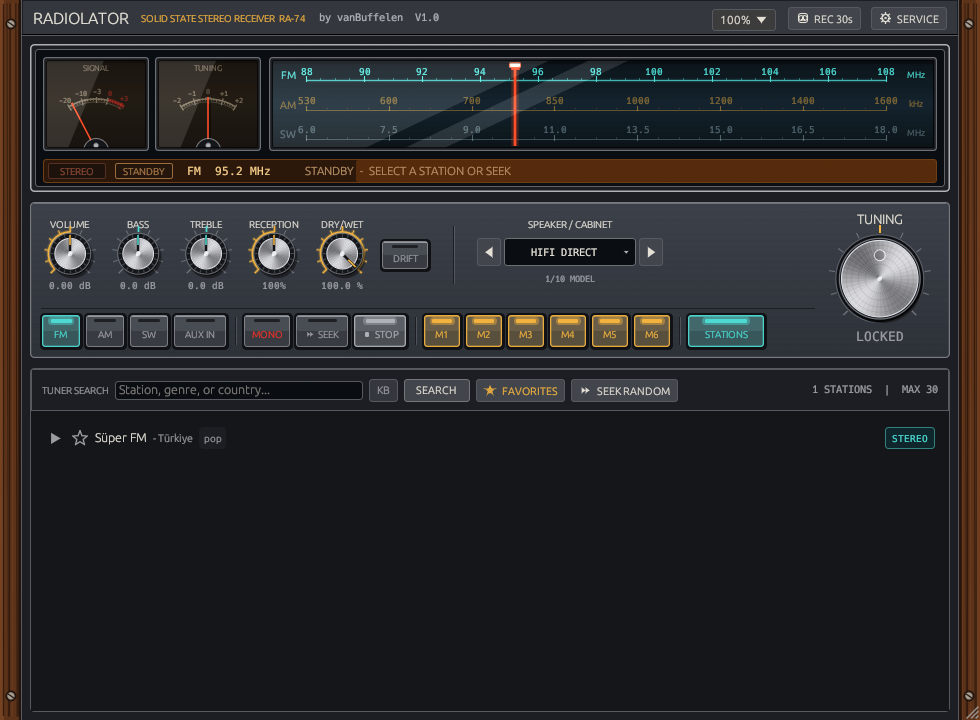
Figure 1.1: The complete Radiolator RA-74 receiver — walnut side cheeks, illuminated glass dial, analog meters, middle control fascia, and live station browser.
2. The Dial, Meters & Top Bar
The upper deck houses the window utility controls, twin analog needle meters, the illuminated three-band glass scale, and the amber station readout strip.
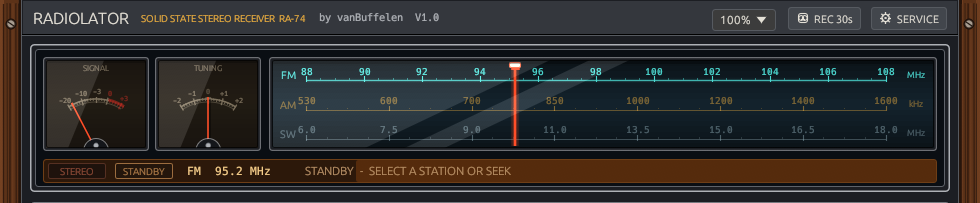
Figure 2.1: Top utility bar, SIGNAL & TUNING meters, FM/AM/SW glass dial, and amber status strip.
Top Bar Controls
100%Size Menu: Makes the whole window smaller or larger (75%up to200%). You can also scroll your mouse wheel over it, double-click to reset to100%, or drag the bottom-right corner of the window.REC 30s: Instantly saves the last 30 seconds of what you heard as a.wavaudio file in your Music folder (Radiolator_Samples), ready to drop straight into a beat or project.SERVICE: Opens an optional calibration drawer if you want to fine-tune the amount of crackle, hum, whistle, and fade speed. ClickDEFAULT SETTINGSinside at any time to reset everything back to factory normal.
Analog Meters & Glass Dial
SIGNALMeter: Swings with how loud and strong the incoming station is.TUNINGMeter: Shows whether you are centered right on the station (0in the middle) or off to the side (-2to+2).- Illuminated Glass Dial (
FM,AM,SW): Click anywhere along the dial or drag the red needle to tune across stations, or clickSEEKto sweep to a random broadcast. - Amber Readout Strip: Shows whether the broadcast is
STEREO,STANDBY, orON AIR, your current frequency, and the station name and country.
3. Knobs, Switches & Tuning Flywheel
The brushed-metal middle deck gives you hands-on analog tone controls, band selection, AUX IN DAW routing, six memory presets, and a weighted tuning wheel.

Figure 3.1: Sound & character knobs, 10-model speaker cabinet selector, band push-buttons, M1–M6 memories, and Tuning flywheel.
Top Row — Sound & Character Knobs
VOLUME: Overall output loudness. Double-click any knob to snap it back to default.BASS&TREBLE: Warm up the low end or brighten/tame the highs.RECEPTION: Turn to100%for clean reception, or turn it down to mix in atmospheric static, crackles, and distance fades. Turn it above100%to boost reception sensitivity.DRY/WET: Blends between the clean original sound (0%) and the full vintage radio sound (100%). Most useful when usingAUX INon a music track.DRIFT: Makes the radio slowly wander off-frequency over time, just like an old analog tuner warming up.SPEAKER / CABINET: Click the arrows or dropdown to play the audio through 10 classic speaker characters:Hi-Fi Direct·Telephone·Old Portable·Pocket Radio·Car Stereo·Cassette·Megaphone·Walkie-Talkie·Gramophone·Intercom.
Bottom Row — Push Buttons & Memories
- Band Buttons (
FM,AM,SW):FM: Clear, full-range stereo music radio.AM: Warm, focused mid-range voice and talk radio feel (always centered in Mono).SW(Shortwave): Distant, mysterious overseas radio texture with livelier atmospheric fades (always centered in Mono).
AUX IN: Switches off the live internet radio stream and sends your own DAW track or instrument audio straight through Radiolator's radio dial, static, drift, and vintage speaker cabinets.MONO: Combines stereo into a centered mono signal (automatically locked on forAMandSW).SEEK/STOP:SEEKsweeps to a new random station;STOPstops playback cleanly.- Memory Buttons (
M1–M6): Save up to 6 favorite stations for instant one-click switching:- Left-click an empty
Mbutton while a station is playing to store it there. - Left-click a lit
Mbutton to jump straight to that saved station. - Right-click a lit
Mbutton to clear that slot.
- Left-click an empty
STATIONS: Opens or hides the station browser drawer below to give you a compact receiver when you just want to useM1–M6andSEEK.
The Large TUNING Flywheel (Right Side)
- Spin / Drag Gently: Nudge slightly off the station (
kHz) to thin out the sound and bring in realistic station bleed and tuning hiss. - Drag Past the Edge & Release: Spins you off into a fresh
SEEKto find another station. - Double-Click: Snaps cleanly back to
LOCKEDright in the center of the station.
4. Finding & Saving Stations (Bottom Drawer)
Search live internet radio stations worldwide by name, genre, or country — or let SEEK RANDOM drop the needle somewhere unexpected.
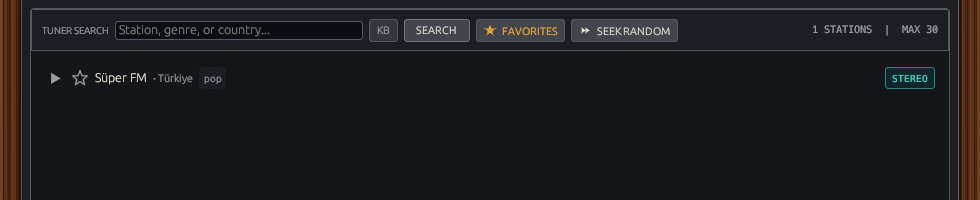
Figure 4.1: Station browser drawer with search bar, mouse-friendly KB toggle, Favorites filter, and Seek Random.
- Search Box (
TUNER SEARCH): Type a station name, music style (like jazz, news, lofi, classical, talk), or country, then press Enter or clickSEARCH. ClickKBif you want an on-screen keyboard to type with your mouse (especially handy in hosts like Logic Pro). FAVORITES: Shows all stations you marked with a star (★). Click the star icon next to any station in the list to add or remove it from your favorites (and your top 6 favorites automatically fillM1–M6).SEEK RANDOM: Instantly sweeps the needle to a surprise live station.- Station List: Click any row's play arrow (or double-click the station) to tune in immediately.
5. For Power Users — The SERVICE & CALIBRATION BAY
SERVICE button in the top-right bar is built for power users and sound designers who want to pop the hood open and dial in every tiny noise, whistle, and timing detail.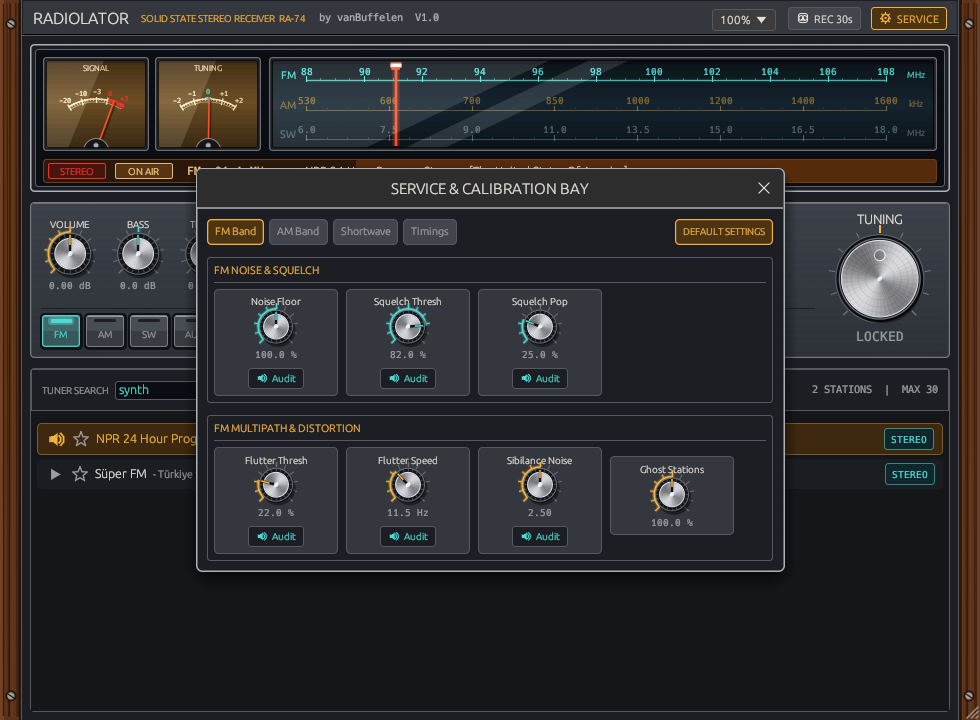
Figure 5.1: Service & Calibration Bay with solo Audit buttons, 4 band/timing tabs, and DEFAULT SETTINGS factory reset.
Safe Experimenting & Solo Preview
DEFAULT SETTINGS(Panic / Factory Reset Button): One click resets every service trimmer, knob, band, and speaker model back to factory condition — so feel free to experiment without worrying about breaking anything.AuditButtons (Solo Preview): Hold your mouse button down on anyAuditbutton underneath a trimmer knob to hear only that specific noise or effect by itself while you adjust it.
Tab 1 — FM Band
Noise Floor: Steady background FM hiss when reception is weak.Squelch Thresh&Pop: Mute threshold and soft thump/click when cutting in and out.Flutter Thresh&Speed: Fast "picket-fence" flutter when driving past buildings or trees.Sibilance Noise: Extra papery static bursts on sharp vocal "S" and "T" sounds.Ghost Stations: Faint bleed-through from neighboring stations.
Tab 2 — AM Band
Noise Floor&Static Crackles: Warm medium-wave static and lightning pops.Mains Hum (EMI)+Off/On Min/Max: Power-line buzz plus quiet/buzz interval lengths.Heterodyne&Ghost Stations: High-pitched AM tuning whistle and adjacent chatter.AGC Pumping: Background noise "breathing" between spoken words or phrases.Crackle Wait/Len&Fade Speed: Storm frequency, duration, and signal swell speed.
Tab 3 — Shortwave (SW)
Hard Static Crashes: Heavy, dramatic atmospheric lightning crashes (with its ownAuditbutton).Noise Floor,Static Crackles,Mains Hum (EMI): Core shortwave background noise and buzz.QRM Int Min/Max: Sudden bursts of distant shortwave interference.AGC Pumping&Fade Speed: Deep, rolling overseas wave-like fading.Heterodyne,Ghost Stations&SW Clean Min/Max: Carrier whistles, bleed, and clean play windows.
Tab 4 — Timings (Receiver & Search)
Drift Resonance&Tuning FX Vol: Nasal filter sweep intensity and dial-scan static volume.Max Search Hits: Number of stations loaded per search (10to100).- 5 Power-User Toggles:
Auto Signal Drift,Auto Resonance,Tuning Sweep SFX,Auto Mono Cabinets, andFilter Dead Streams. Drift Wait/Move,Min/Max Seek Time,Clean Mode Min/Max: Controls drift cadence, scan duration, and clean startup windows.
6. Retro Sound Design & Sampling Recipes
Quick starting points for turning 2026 digital tracks into 1974 radio magic (or mining live stations for samples):
1. The 1974 Pocket Transistor in a Rainstorm
Lo-Fi / Intro & HooksTurn a shiny modern synth or acoustic guitar into a nostalgic intro that sounds like it's drifting out of a cheap portable radio on a rainy porch.
2. 2 AM Shortwave Numbers Station
Sound Design / AmbientConjure eerie, mysterious overseas radio textures with deep ionospheric swells, carrier whistles, and distant lightning crashes.
3. Happy-Accident Crate Digging
Beatmaking / SamplingLet Radiolator roam across international jazz, Turkish pop, talk radio, and classical stations while you build drums.
4. Parallel Dashboard Crunch on Drum Bus
Mixing / CharacterGive sterile programmed drums midrange punch and analog radio glue without losing your sub-bass weight.
7. Installation & User Data Paths
Radiolator is 100% free and ships as native binaries for Linux, Windows, and macOS Universal2:
Linux (x86_64)
- Standalone: Copy
linux-x86_64/radiolatorto~/.local/bin/radiolator(chmod +x). - CLAP: Copy
linux-x86_64/radiolator.clapto~/.clap/. - VST3: Copy
linux-x86_64/radiolator.vst3to~/.vst3/.
Windows (x86_64)
- Standalone: Run
windows-x86_64/radiolator.exedirectly. - CLAP: Copy
windows-x86_64/radiolator.claptoC:\Program Files\Common Files\CLAP\. - VST3: Copy
windows-x86_64/radiolator.vst3toC:\Program Files\Common Files\VST3\.
macOS (Universal2 — Apple Silicon M1–M4 & Intel)
- Standalone: Drag
macos-universal2/Radiolator.appto/Applications/and runxattr -cr /Applications/Radiolator.apponce in Terminal. - Logic Pro / GarageBand / MainStage (AUv2): Copy
macos-universal2/Radiolator.componentto~/Library/Audio/Plug-Ins/Components/and runxattr -cr ~/Library/Audio/Plug-Ins/Components/Radiolator.component. - Bitwig Studio / REAPER (CLAP): Copy
macos-universal2/Radiolator.clapto~/Library/Audio/Plug-Ins/CLAP/and runxattr -cr ~/Library/Audio/Plug-Ins/CLAP/Radiolator.clap.
User Data & Sample Recordings
- Saved Favorites:
~/.radiolator_favorites.json(Windows:%USERPROFILE%\.radiolator_favorites.json) - Service Settings:
~/.radiolator_settings.json(Windows:%USERPROFILE%\.radiolator_settings.json) - 30s WAV Recordings:
~/Music/Radiolator_Samples/(Windows:%USERPROFILE%\Music\Radiolator_Samples\)
8. Control & Service Reference
Search any knob, switch, cabinet model, or Service Bay trimmer below:
| ID | Control | Section | Type | Default | Range / Options | Unit | Description |
|---|---|---|---|---|---|---|---|
| band | Band Selector | Front Panel | Switch | FM | FM / AM / SW | — | Switches between full-range stereo FM (88–108 MHz), warm mono AM (530–1600 kHz), and distant mono Shortwave (6.0–18.0 MHz). |
| aux_in | AUX IN | Front Panel | Toggle | Off | Off / On | — | Bypasses the live internet radio stream and routes your DAW track or instrument audio through Radiolator's dial, static, drift, and cabinets. |
| volume | VOLUME | Front Panel | Knob | 0.00 dB | Output loudness | dB | Master output level of the receiver. Double-click to snap back to 0.00 dB. |
| bass | BASS | Front Panel | Knob | 0.0 dB | Low-end tone | dB | Warms up or tightens the low frequencies in classic 1970s stereo receiver style. |
| treble | TREBLE | Front Panel | Knob | 0.0 dB | High-end tone | dB | Brightens or tames the upper frequencies and hiss. |
| reception | RECEPTION | Front Panel | Knob | 100% | 0% – >100% | % | 100% delivers clean reception; lower values mix in atmospheric static, crackles, and fades. Above 100% boosts sensitivity. |
| dry_wet | DRY/WET | Front Panel | Knob | 100.0% | 0.0% – 100.0% | % | Blends between the clean original input (0%) and the full vintage radio signal (100%). Ideal with AUX IN. |
| drift | DRIFT | Front Panel | Toggle | Off | Off / On | — | Causes the tuner to slowly wander off-frequency over time like an analog oscillator warming up. |
| cabinet | SPEAKER / CABINET | Front Panel | Selector (10) | Hi-Fi Direct | Hi-Fi Direct, Telephone, Old Portable, Pocket Radio, Car Stereo, Cassette, Megaphone, Walkie-Talkie, Gramophone, Intercom | model | Routes audio through 10 classic vintage speaker and enclosure models. |
| mono | MONO | Front Panel | Toggle | Off (FM) | Off / On | — | Sums stereo to centered mono. Automatically locked on for AM and SW bands. |
| seek_stop | SEEK / STOP | Front Panel | Action | Standby | SEEK / STOP | — | SEEK sweeps the red needle across the glass dial to a random live broadcast; STOP halts playback cleanly. |
| memories | M1 – M6 Presets | Front Panel | Memory Bank | Top 6 Favorites | 6 slots | slot | Left-click empty to store playing station; left-click lit to recall; right-click lit to clear. |
| tuning_wheel | TUNING Flywheel | Front Panel | Rotary Wheel | LOCKED | Detune kHz / Fling to SEEK | kHz | Nudge gently off-station for bleed and hiss, drag past the edge to trigger a fresh SEEK, or double-click to snap to LOCKED. |
| rec_30s | REC 30s | Top Bar | Action | Rolling Buffer | Last 30 seconds | WAV | Saves the last 30 seconds of heard audio as a .wav file in ~/Music/Radiolator_Samples/. |
| ui_scale | Window Scale | Top Bar | Dropdown / Drag | 100% | 75% – 200% | % | Scales the receiver UI via dropdown, mouse wheel, double-click reset, or bottom-right corner drag. |
| fm_noise | FM Noise / Squelch / Flutter | Service: FM | Trimmers + Audit | Factory | Noise Floor, Squelch Thresh/Pop, Flutter Thresh/Speed, Sibilance, Ghost Stations | trim | Fine-tunes FM hiss, muting clicks, car-radio picket-fence flutter, vocal sibilance static, and adjacent bleed. |
| am_trimmers | AM Static / EMI / Heterodyne | Service: AM | Trimmers + Audit | Factory | Noise Floor, Crackles, Mains Hum (EMI) Off/On, Heterodyne, Ghost, AGC Pumping, Crackle/Fade Timings | trim | Controls medium-wave static storms, power-line buzz intervals, overlap whistles, and AGC breathing. |
| sw_trimmers | SW Crashes / QRM / Fading | Service: SW | Trimmers + Audit | Factory | Hard Static Crashes, Noise, Crackles, EMI, QRM Int, AGC, Fade Speed, Heterodyne, Ghost, SW Clean Min/Max | trim | Shapes overseas shortwave lightning crashes, sudden QRM interference bursts, and ionospheric fading. |
| timings | Timings & Receiver Prefs | Service: Timings | Trimmers & Toggles | Factory | Drift Resonance, Tuning FX Vol, Max Search Hits (10–100), 5 Power-User Toggles, Drift/Seek/Clean Timings | trim / bool | Configures auto drift resonance, sweep SFX, auto-mono cabinets, dead-stream filtering, and timing bounds. |