
1. Overview & CLAP Setup
The Roland S-1 Patch Generator is a dedicated CLAP plugin that provides complete remote control, parameter automation, and intelligent patch generation for the hardware Roland AIRA Compact S-1 Tweak Synthesizer (which is based on the classic SH-101 architecture).
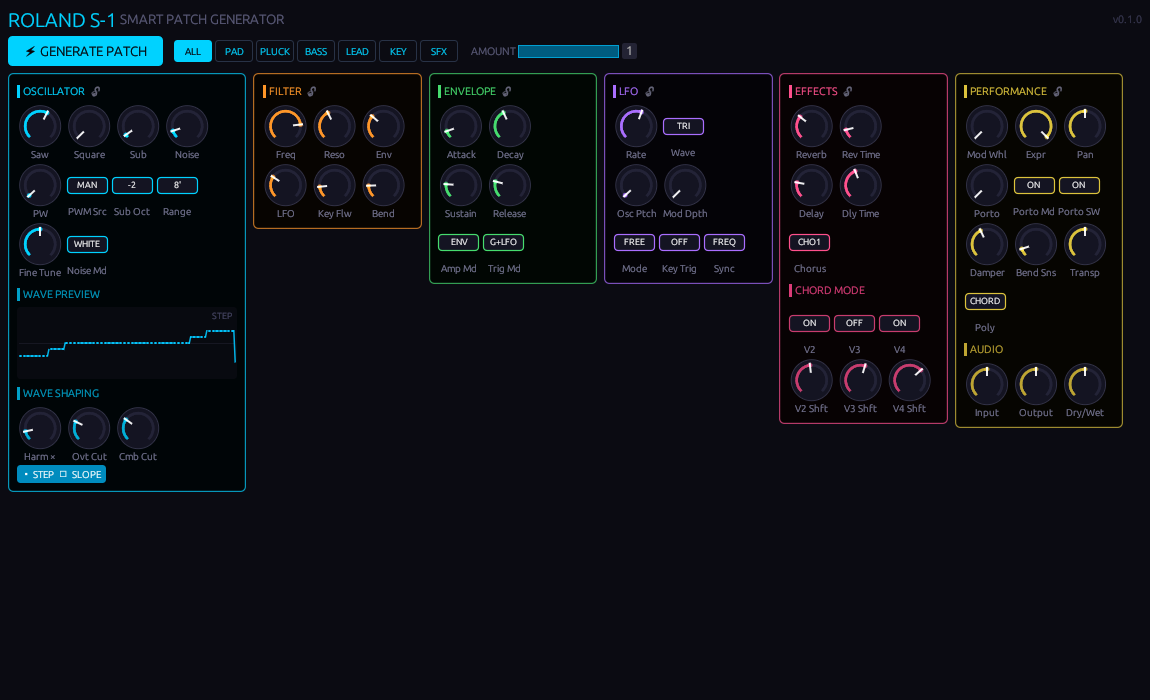
Active plugin interface displaying real-time parameter feedback and composite waveform preview.
DAW Track Setup
- Insert Plugin: Add the CLAP plugin to a MIDI/Instrument track in your DAW (e.g. Bitwig Studio 6, Carla, Reaper).
- MIDI Routing: Route the plugin's MIDI output to your Roland S-1 hardware on MIDI Channel 1.
- Audio Routing: Route the stereo audio output from your Roland S-1 into the plugin's stereo input for direct monitoring and level control.
- Hardware Verification: On the Roland S-1, press
[SHIFT]+[MENU], navigate toMIDI, and verify thatCC Rxis set to ON.
2. Generator Controls & Style Selectors

The top toolbar houses the intelligent patch generation engine:
- ⚡ GENERATE PATCH: Triggers the randomized patch generator and instantly transmits all 54 updated parameters to the Roland S-1 hardware via MIDI CC.
- STYLE SELECTORS:
ALL: Open, wide randomization across every parameter.PAD: Long attack/release, warm saw/square mix, sub-oscillator body, low cutoff, rich reverb, polyphonic.PLUCK: Fast attack (< 20ms), punchy decay, zero sustain, high filter envelope depth, delay focused.BASS: Heavy sub level, low octave register, snappy cutoff bite, monophonic with portamento glide.LEAD: Mid-to-high register, monophonic with glide, audible vibrato (LFO to pitch), subtle delay/reverb.KEY: Balanced oscillator blend, filter key tracking, fast attack, polyphonic, Roland Juno chorus enabled.SFX: Unconstrained experimental noises, audio-rate LFOs, extreme resonance, chaotic modulation.
- AMOUNT SLIDER:
1.00(100%): Complete regeneration to a fresh sound within the selected style.0.10 – 0.30(10%–30%): Patch Morphing — nudges current settings subtly toward new targets without destroying your foundation.0.00(0%): No change.
- MODULE LOCKS (🔒 / 🔓): Click any lock icon in a module header to freeze those parameters during generation.
3. Interface Controls
- Rotary Knobs: Click and drag vertically (up = increase, down = decrease). A value arc and hover glow indicate current status.
- Cycle Buttons: Click to advance to the next state (e.g. wave shapes, octaves, modes).
- Waveform Display: Real-time vector preview showing the composite oscillator shape based on current Saw, Square, Sub, Pulse Width, Draw, Chop, and Step/Slope settings.
4. Module Breakdown
Oscillator Section (Cyan)
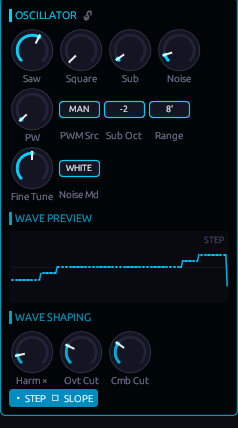
Controls the core tone generation of the S-1:
- Saw & Square & Sub: Independent level controls for the three primary tone generators.
- PW & PWM Src: Pulse width and modulation source (
LFO,MANmanual,ENVenvelope). - Sub Oct: Sub-oscillator octave mode:
-1oct,-2oct, or-2P(narrow pulse). - Range: Octave footage selection from 64' down to 2'.
- Harm ×, Ovt Cut, Cmb Cut: Controls for the S-1's modern Draw and Chop features, multiplying harmonics and sculpting overtone combs.
- Step/Slope: Waveform quantization (
OFF= smooth analog,STEP= 8-step lo-fi digital,SLOPE= linear smoothed).
Filter (Orange) & Envelope (Green)
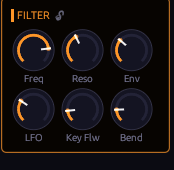
Filter Parameters:
- Freq & Reso: 4-pole low-pass cutoff and self-oscillating resonance.
- Env & LFO: Cutoff modulation depths.
- Key Flw: Keyboard tracking (0% = static, 100% = tracks played note).
- Bend: Pitch wheel sensitivity to filter cutoff.
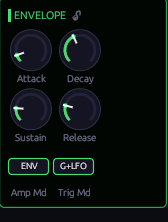
Envelope Parameters:
- ADSR: Full Attack, Decay, Sustain, and Release times.
- Amp Md:
GATE(instant on/off) orENV(full ADSR shaping). - Trig Md: Trigger source:
GATE,LFO,G+LFO, orKEY.
LFO (Purple) & Effects / Chord Mode (Pink)
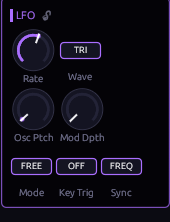
LFO Parameters:
- Rate & Wave: Speed and shape (
SIN,TRI,SAW,SQR,S&H,RND). - Osc Ptch: LFO pitch vibrato depth.
- Mode & Sync: Clock run mode (
FREE,SYNC,1SHT,KEY) and tempo sync.
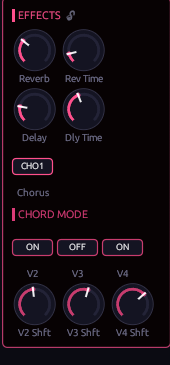
Effects & Chord Mode:
- Reverb & Delay: Wet levels and decay / delay times.
- Chorus: Authentic Roland Juno chorus emulation (
OFF,CHO1,CHO2,CHO3). - V2, V3, V4 & Shifts: Individual 4-voice chord mode pitch intervals (-24 to +24 semitones).
Performance & Audio (Yellow)
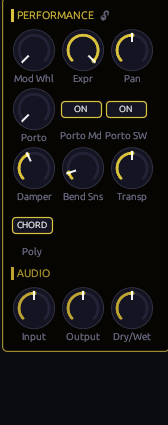
- Polyphony Mode: Choose between
MONO,POLY(4-voice),UNIS(unison), andCHORDmode. - Portamento: Portamento glide time, master switch (
OFF/ON), and legato mode (AUTO/ON). - CLAP Audio Passthrough: Input Gain, Output Level, and Dry/Wet mix balance.
5. Complete MIDI CC Reference (All 54 Parameters)
Every parameter in the plugin communicates via sample-accurate 7-bit MIDI CC messages on Channel 1:
| CC | Parameter | Section | Values / Range | Description |
|---|---|---|---|---|
| 1 | Mod Whl | Performance | 0 – 127 | Modulation wheel depth |
| 3 | Rate | LFO | 0 – 127 | LFO speed / frequency |
| 5 | Porto | Performance | 0 – 127 | Portamento glide time |
| 10 | Pan | Performance | 0 – 127 | Stereo pan position |
| 11 | Expr | Performance | 0 – 127 | Expression pedal input level |
| 12 | Wave | LFO | SIN, TRI, SAW, SQR, S&H, RND | LFO waveform type |
| 13 | Osc Ptch | LFO | 0 – 127 | LFO vibrato depth to pitch |
| 14 | Range | Oscillator | 64', 32', 16', 8', 4', 2' | Octave range footage |
| 15 | PW | Oscillator | 0 – 127 | Square wave pulse width |
| 16 | PWM Src | Oscillator | LFO, MAN, ENV | PWM modulation source |
| 17 | Mod Dpth | LFO | 0 – 127 | General mod wheel LFO depth |
| 18 | Bend Sns | Performance | 0 – 127 | Pitch bend wheel range sensitivity |
| 19 | Square | Oscillator | 0 – 127 | Square / pulse wave level |
| 20 | Saw | Oscillator | 0 – 127 | Sawtooth level |
| 21 | Sub | Oscillator | 0 – 127 | Sub-oscillator level |
| 22 | Sub Oct | Oscillator | -1, -2, -2P | Sub-octave type (-2P = narrow pulse) |
| 23 | Noise | Oscillator | 0 – 127 | Noise generator level |
| 24 | Env | Filter | 0 – 127 | Filter envelope modulation depth |
| 25 | LFO | Filter | 0 – 127 | Filter LFO modulation depth |
| 26 | Key Flw | Filter | 0 – 127 | Filter keyboard tracking (0–100%) |
| 27 | Bend | Filter | 0 – 127 | Filter pitch bend wheel sensitivity |
| 28 | Amp Md | Envelope | GATE, ENV | VCA amplifier mode (instant vs ADSR) |
| 29 | Trig Md | Envelope | GATE, LFO, G+LFO, KEY | Envelope trigger source |
| 30 | Sustain | Envelope | 0 – 127 | Envelope sustain level |
| 31 | Porto Md | Performance | AUTO, ON | Portamento legato mode |
| 64 | Damper | Performance | 0 – 127 | Sustain pedal switch |
| 65 | Porto SW | Performance | OFF, ON | Portamento master switch |
| 71 | Reso | Filter | 0 – 127 | 4-pole filter resonance (self-oscillates) |
| 72 | Release | Envelope | 0 – 127 | Envelope release fade time |
| 73 | Attack | Envelope | 0 – 127 | Envelope attack rise time |
| 74 | Freq | Filter | 0 – 127 | 4-pole low-pass cutoff frequency |
| 75 | Decay | Envelope | 0 – 127 | Envelope decay fall time |
| 76 | Fine Tune | Oscillator | 0 – 127 | Fine pitch tuning |
| 77 | Transp | Performance | 0 – 127 | Keyboard pitch transpose |
| 78 | Noise Md | Oscillator | WHITE, PINK | Noise color spectrum |
| 79 | Mode | LFO | FREE, SYNC, 1SHT, KEY | LFO clock run mode |
| 80 | Poly | Performance | MONO, POLY, UNIS, CHORD | Voice allocation mode |
| 81 | V2 | Chord | OFF, ON | Chord voice 2 enable switch |
| 82 | V3 | Chord | OFF, ON | Chord voice 3 enable switch |
| 83 | V4 | Chord | OFF, ON | Chord voice 4 enable switch |
| 85 | V2 Shft | Chord | 0 – 127 (-24 to +24 st) | Voice 2 semitone transposition |
| 86 | V3 Shft | Chord | 0 – 127 (-24 to +24 st) | Voice 3 semitone transposition |
| 87 | V4 Shft | Chord | 0 – 127 (-24 to +24 st) | Voice 4 semitone transposition |
| 89 | Rev Time | Effects | 0 – 127 | Reverb decay time |
| 90 | Dly Time | Effects | 0 – 127 | Delay repeat timing |
| 91 | Reverb | Effects | 0 – 127 | Reverb wet level |
| 92 | Delay | Effects | 0 – 127 | Delay wet level |
| 93 | Chorus | Effects | OFF, CHO1, CHO2, CHO3 | Roland Juno chorus type |
| 102 | Harm × | Oscillator | 0 – 127 (1x – 4x) | Draw harmonic multiplier |
| 103 | Ovt Cut | Oscillator | 0 – 127 | Chop overtone filter cut depth |
| 104 | Cmb Cut | Oscillator | 0 – 127 | Chop comb filter depth |
| 105 | Key Trig | LFO | OFF, ON | Key strike phase reset |
| 106 | Sync | LFO | PHAS, FREQ | LFO tempo sync mode |
| 107 | Step/Slope | Oscillator | OFF, STEP, SLOPE | Waveform quantization mode |
6. Saving Patches to Hardware Memory
When you generate a patch in the plugin that you love, you can commit it directly into the hardware's internal EEPROM memory:
- Hold
[SHIFT]and press[WRITE]on the physical Roland S-1. - Press one of the 16 step buttons (1–16) to choose a destination pattern/preset slot.
- Press
[WRITE]again to confirm. All 54 parameters are now permanently saved into the hardware!