RaytraceVerbGPU
A next-generation GPU-accelerated raytracing reverb engine. Calculates authentic acoustic reflections in real-time using simulated photons and 3D meshes. [BETA]
RaytraceVerbGPU (BETA)
The RaytraceVerbGPU represents a paradigm shift in spatial audio processing. Instead of relying on traditional algorithmic feedback delay networks (FDNs) or static impulse responses (IRs), this plugin physically simulates sound propagation in real-time using GPU-accelerated raytracing.
[!WARNING] BETA PHASE: This plugin is currently in active development. Performance optimization, stability, and features are subject to change. Use with caution in critical sessions.
Technical Architecture
Under the hood, RaytraceVerbGPU offloads acoustic calculation entirely to your graphics card (via WebGPU/wgpu), freeing up your CPU for other mixing tasks.
Core Simulation Engine
- WGSL Compute Shaders: The heavy lifting is done by custom WebGPU (WGSL) compute shaders running directly on your graphics card. It uses a highly optimized Bounding Volume Hierarchy (BVH) tree to calculate intersections in massive 3D scenes.
- Raytraced Acoustics: The engine fires up to 100,000 acoustic rays per calculation using a PCG Hash pseudo-random number generator for uniform spherical or conical spreading. It calculates up to 200 bounces per ray, determining intersections via the Möller–Trumbore algorithm.
- Physical Materials: Every surface in the 3D mesh can be assigned unique acoustic materials with specific
absorptionandscatteringvalues, accurately simulating specular (mirror-like) versus diffuse (scattered) reflections. - Listener Modes: Includes accurate Head-Related Transfer Function (HRTF) inspired properties like
MonoITD(Interaural Time Difference) and adjustable mic spacing/angles for true stereo imaging. The final impulse response is split intoLow,Mid, andHighfrequency Ambisonic (W, X, Y, Z) channels for maximum spatial fidelity.
Virtual Soundstage
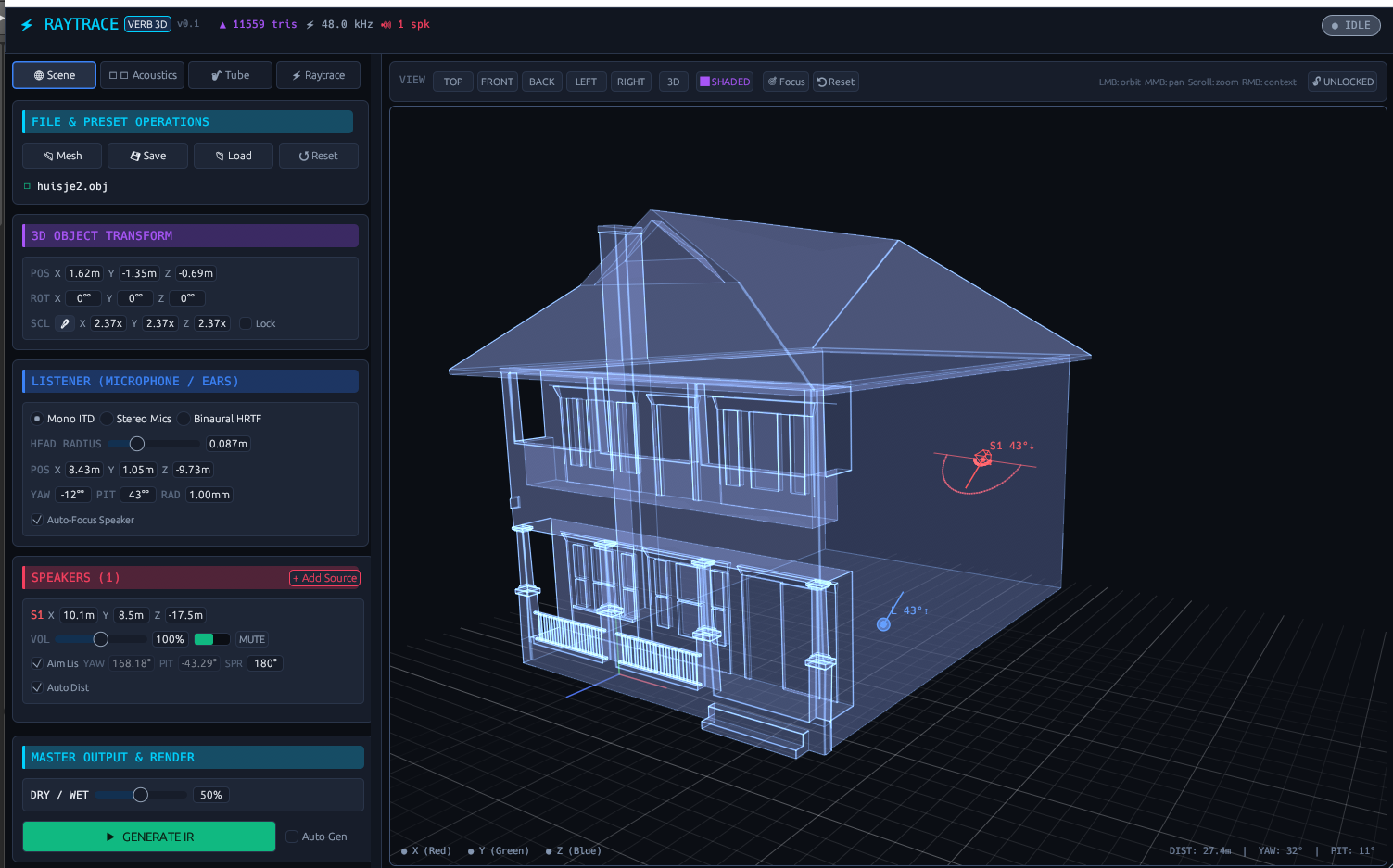
- Spatial Positioning: You can manually position the “Listener” (your virtual microphones) and up to 3 independent “Speakers” (sound sources) within the 3D space using X, Y, and Z coordinates.
- Dynamic Acoustics: As you move the listener or speakers around the virtual room, the impulse response is recalculated, changing the reverb tail dynamically based on the exact physics of the room.
- Tube Resonance: Includes an algorithmic “Tube” resonance section (
Tube Length,Feedback,Damping) to add localized physical modeling before the signal enters the vast raytraced room.
Custom 3D Rooms (.obj Meshes)
RaytraceVerbGPU lets you import standard Wavefront 3D files (.obj) to model the acoustic properties of real or impossible physical spaces. The raytracing engine bounces simulated audio rays directly off the 3D polygon triangles.
How to Create Your Own .obj Acoustic Spaces
You can design custom rooms, cathedrals, stairwells, or sci-fi acoustic chambers in any 3D software (like Blender, SketchUp, or FreeCAD) and export them for use in the plugin.
1. Modeling Guidelines for Audio Raytracing
- Real-World Scale (1 Unit = 1 Meter): In Blender, 1 unit equals 1 meter. Design spaces with realistic dimensions (e.g., a
6m × 4m × 2.8mmixing control room, or a40m × 25m × 18mconcert hall). - Center at Origin (0,0,0): Place the center of the room at coordinate
(0, 0, 0). This ensures that your virtual Listener and Speakers (which start near the center) spawn inside the room rather than outside. - Closed / Inward-Facing Geometry: Ensure your room is an enclosed hull. Check that your face normals are pointing inward toward the interior of the room where the sound travels (in Blender: Mesh → Normals → Flip).
- Keep Polygons Reasonable (Low-to-Medium Poly): Raytracing performance thrives on clean geometry. Aim for 500 to 10,000 triangles. Intricate wall ornaments or excessive subdivisions are unnecessary for sound waves—acoustics are shaped primarily by the macro-geometry and surface material settings.
- Avoid Zero-Thickness Double Faces: Clean up non-manifold geometry, zero-area faces, and duplicate vertices (Mesh → Clean Up → Merge by Distance).
2. Exporting from Blender to .obj
When exporting your model from Blender:
- Go to File → Export → Wavefront (.obj).
- In the export settings panel:
- Enable Triangulate Faces (ensures all polygons are 3-vertex triangles for the ray intersection kernel).
- Check Export Normals.
- Set Forward: -Z Forward and Up: Y Up (or standard Cartesian coordinates).
- Save the
.objfile.
3. Loading in RaytraceVerbGPU
- Load your
.objdirectly through the plugin’s file browser. - Position your Speakers and Listener inside the room mesh boundaries.
- Adjust the global material absorption, diffuse scattering, and tube resonance to hear your custom 3D architecture come to life in real-time!
Common Use Cases
- Cinematic Sound Design: Place a sound source 100 meters away in a massive virtual cavern. The true physical delay and high-frequency air absorption create an unparalleled sense of distance and scale.
- Hyper-Realistic Foley: Match the acoustic signature of a specific room by adjusting the dimensions and moving the listener microphone exactly where the camera would be.
- Immersive Mixes: Instead of panning instruments, physically place them in different X/Y/Z coordinates within the room to create a natural, cohesive 3D mix without artificial stereo widening.
Built with Rust, NIH-plug, egui, and wgpu. Tested on Debian Trixie (RT-Kernel), Bitwig Studio 6, and Carla.