Roland S-1 Patch Generator
A utility plugin to fully automate and control your hardware Roland AIRA Compact S-1 synthesizer directly from your DAW using MIDI CC.
Roland S-1 Patch Generator (BETA)
The Roland S-1 Patch Generator is not an audio effect or a software synthesizer in the traditional sense. Instead, it is a dedicated MIDI utility plugin designed to bridge the gap between your modern DAW and the hardware Roland AIRA Compact S-1 Tweak Synthesizer (which is based on the legendary SH-101).
Technical Architecture
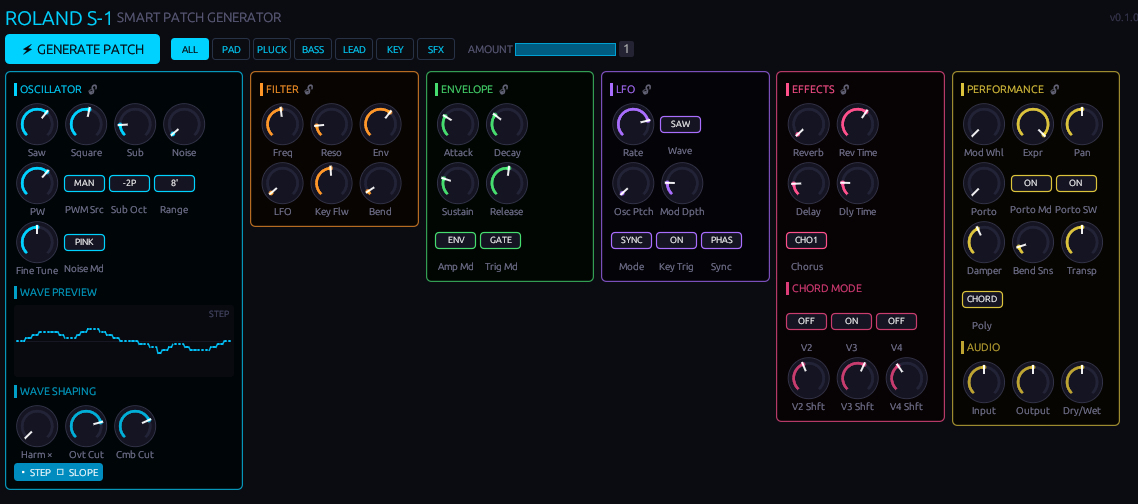
Under the hood, this plugin translates high-resolution DAW automation data into standard 7-bit MIDI Continuous Controller (CC) messages.
It maps exactly to the 54 unique MIDI CC destinations recognized by the Roland S-1 firmware. This includes everything from the obvious (Filter Cutoff, Resonance, Envelopes) to the deeply hidden shift-functions that are hard to reach on the physical unit (like the exact Polyphony Mode, Sub-Oscillator Type, Oscillator Draw Step Slope, and Chorus Type).
Whenever you turn a knob in the plugin GUI—or when your DAW reads an automation lane—the plugin instantly fires off a precise NoteEvent::MidiCC message to sync the hardware.
How to use this plugin in your DAW
Because this plugin generates MIDI data instead of audio, the setup is slightly different than a standard effect:
- Insert the Plugin: Load the Roland S-1 Patch Generator onto a MIDI track (or as a MIDI effect/instrument, depending on how your specific DAW handles MIDI plugins).
- Route the MIDI Output: In your DAW’s routing section, set the MIDI Output of this track to your physical Roland S-1 (which should be connected via USB or a MIDI interface).
- Automate Everything: Open your DAW’s automation lanes for the plugin. You can now draw precise automation curves for every single parameter of the S-1.
- Hardware Sync: Press play in your DAW, and watch your physical Roland S-1 magically respond to all your drawn automation in real-time, bringing your hardware sequences to life!
[!WARNING] BETA PHASE: This utility is still in beta. MIDI CC routing and synchronization might behave differently depending on your specific DAW and MIDI interface setup.
[!IMPORTANT] Sequencer Limitation: This plugin is designed to control sound parameters and synth patches via MIDI CC. It cannot control, trigger, or modify the internal hardware sequencer or individual sequencer steps, as the Roland S-1 firmware does not expose sequencer step data over MIDI CC.
[!NOTE] A personal project: I originally built this utility plugin purely for my own workflow, because I wanted full automation control over my hardware Roland S-1. However, I realized it might be incredibly handy for other S-1 owners too, so here it is—completely free!
Built with Rust, NIH-plug, and egui. Tested on Debian Trixie (RT-Kernel), Bitwig Studio 6, and Carla.